

Casio fx-5800P & fx-3650P II Programmable Calculator Guide: Formulas, Base-N & LCD Programming
Executive Takeaways
- The Surveyor's Standard: The Casio fx-5800P is celebrated globally in civil engineering and land surveying for its 28,500-byte formula storage and multi-line program execution.
- 100% On-Screen Execution: Unlike generic web calculators that use browser popups or alerts, the authentic fx-5800P runs programs directly on its 4-line dot-matrix LCD screen with interactive
?prompts and?pause points. - Base-N Digital Logic: Supports 32-bit two's complement arithmetic and instant switching across Decimal, Hexadecimal, Binary, and Octal formats.
- CALC & FMLA Libraries: Evaluate parameterized functions or draw from built-in physics and electrical formulas (Ohm's Law, Coulomb Force, Kinetic Energy, Ideal Gas).
1. The Architecture of the Casio fx-5800P Super-FX Plus
Introduced by Casio as a premier natural textbook programmable calculator, the fx-5800P bridges the gap between traditional non-programmable scientific calculators (like the fx-991EX) and bulky graphing calculators. Its signature feature is a high-resolution 4-line dot-matrix LCD display paired with Casio BASIC programming language capabilities.
?? The 4-Line Dot-Matrix Display Explained
- Line 1 (Status Flags & Header): Displays active modes (
PRGM,D,R,G,Sfor Shift,Afor Alpha,Mfor Memory, andDEC/HEXin Base-N). - Line 2 (Expression & Input Prompt): Displays natural mathematical expressions or user input prompts (e.g.
A? 15.5) with a blinking block cursor. - Line 3 (Intermediate Step & Pause Indicator): Displays sub-calculations or pauses output with the blinking
?symbol until you press EXE. - Line 4 (Final Result & Ans): Shows right-aligned numerical output or
Dispindicating program execution completion.
Looking to write custom formulas, conditional branches & loops?
Read our companion tutorial: How to Program a Scientific Calculator with an interactive LCD simulator, copy-ready quadratic and coordinate inverse formulas, and memory optimization rules.
2. Casio BASIC Programming Language Syntax Guide
Writing programs on the Casio fx-5800P follows a structured, streamlined syntax designed for fast data entry in the field. Below are the foundational syntax tokens:
| Syntax Token | Keypad Shortcut | Functional Description | Example Usage |
|---|---|---|---|
?[VAR] |
ALPHA + , |
Prompts the user for a numerical value on the LCD. | ?A |
? (Store) |
RCL (STO) | Assigns the evaluated result of a formula to a memory variable. | (B²-4AC)?D |
: (Separator) |
SHIFT + v |
Statement delimiter that executes commands sequentially. | ?A:?B:A+B?C |
? (Disp Pause) |
ALPHA + EXE |
Pauses calculation to display the intermediate output until EXE is pressed. | "X1="X?"X2="Y? |
"TEXT" |
ALPHA + v |
Prints an informational label on the screen before a number. | "AREA="X? |
3. The Top 10 Essential Field Engineering & Math Program Codes
Enter these battle-tested routines directly into memory slots P1 – P4 (or program memory) on your Casio fx-5800P, fx-3650P II, or the LocalDoc Scientific Calculator. Each program includes the exact Casio-BASIC syntax, parameter prompts, and real-world calculation steps.
Program 1: Complete Quadratic Equation Solver (P1: QUAD)
?A:?B:?C:(B²-4AC)?D:(-B+vD)/(2A)?X:(-B-vD)/(2A)?Y:"X1="X◢"X2="Y◢
Application: Structural deflection, projectile dynamics, and quadratic circuit impedance. Prompts for coefficients a, b, c, computes discriminant Δ = b2 - 4ac, and steps through X1 and X2 on the LCD.
Program 2: Heron's Formula for Irregular Land Parcels (P2: HERON)
?A:?B:?C:(A+B+C)/2?S:v(S(S-A)(S-B)(S-C))?X:"AREA="X◢
Application: Land boundary and triangular cadastral surveying. Calculates total parcel area from three perimeter measurements without measuring angles.
Program 3: Electrical Power & AC Impedance (P3: OHM-Z)
?R:?X:Pol(R,X)?Z:Y?T:"MAG_Z="Z◢"PHASE="T◢
Application: Electrical and RF engineering. Converts rectangular impedance R + jX into polar magnitude |Z| = √(R2 + X2) and phase angle θ = arctan(X/R).
Program 4: Land Surveying Coordinate Inverse & Bearing (P4: SURVEY-INV)
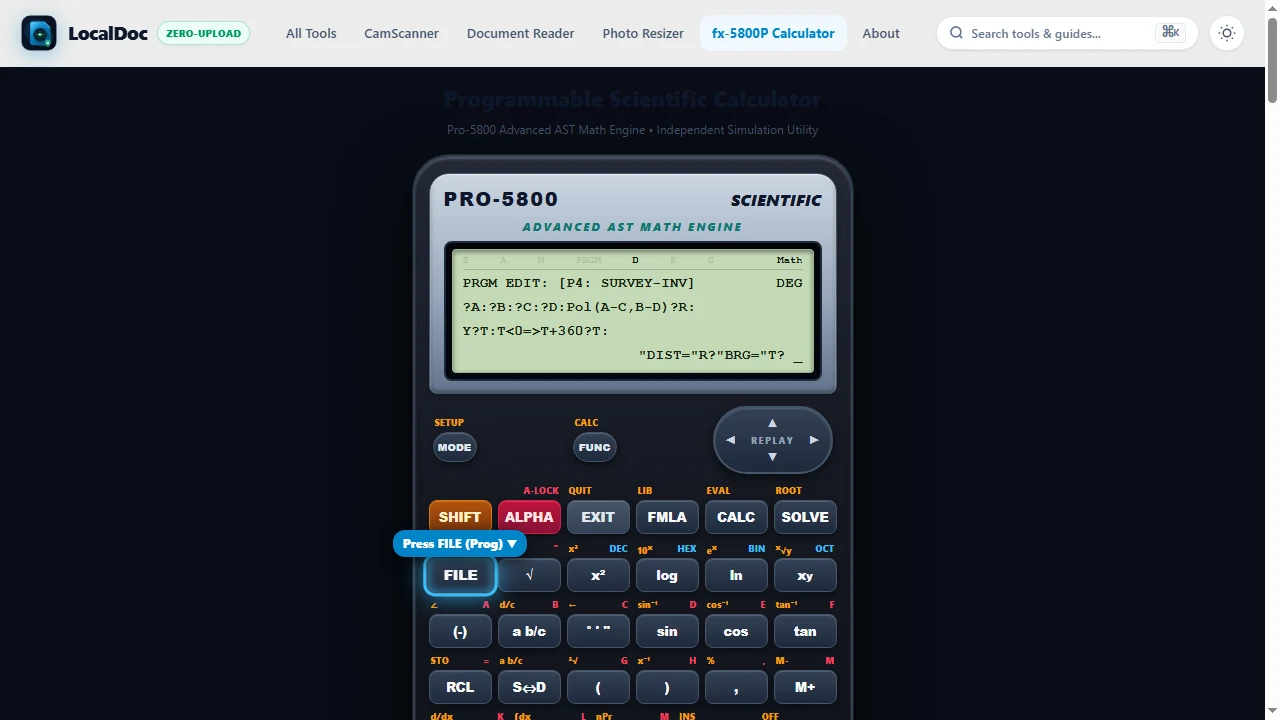
?A:?B:?C:?D:Pol(A-C,B-D)?R:Y?T:T<0=>T+360?T:"DIST="R◢"BRG="T◢
Application: High-precision boundary traverse. Computes horizontal distance R and standard whole-circle bearing azimuth T between two control coordinates.
Program 5: Optical Leveling Height of Instrument (HI) & Reduced Level (P5: LEVELING)
?B:?S:B+S?H:"HI="H◢Lbl 1:?F:H-F?R:"RL="R◢Goto 1
Application: Civil site leveling and grade checking. Prompts for Benchmark elevation B and Backsight S to establish Height of Instrument H = B + S. Loops continuously through Intermediate/Foresight staff readings F to instantly compute Reduced Levels RL = H - F.
Program 6: Simple Circular Road Curve Staking Elements (P6: ROAD-CURV)
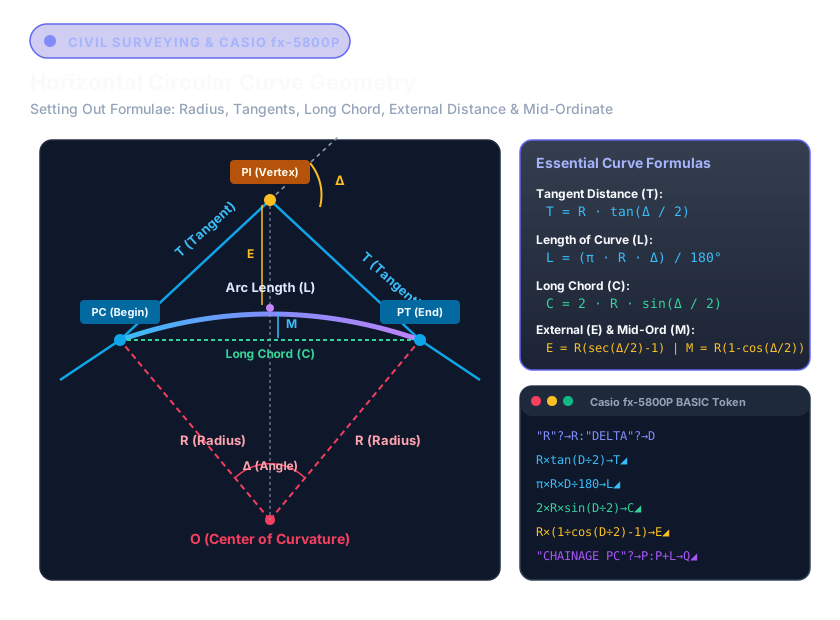
?R:?I:R*tan(I/2)?T:π*R*I/180?L:R*(1/cos(I/2)-1)?E:"TANG="T◢"LENGTH="L◢"EXTERNAL="E◢
Application: Highway and railway curve alignment. Prompts for Curve Radius R and Deflection Angle I to compute Tangent Length T, Curve Arc Length L, and Apex External Distance E.
Program 7: 2x2 System of Linear Equations Solver (Cramer's Rule) (P7: SIMULT-2)
?A:?B:?C:?D:?E:?F:(A*E-B*D)?M:(C*E-B*F)/M?X:(A*F-C*D)/M?Y:"X="X◢"Y="Y◢
Application: Mesh circuit currents and statics truss analysis. Solves a1 x + b1 y = c1 and a2 x + b2 y = c2 using matrix determinants without manual elimination.
Program 8: 3D Vector Cross Product & Magnitude (P8: VECT-CROSS)
?A:?B:?C:?D:?E:?F:(B*F-C*E)?I:(C*D-A*F)?J:(A*E-B*D)?K:v(I²+J²+K²)?M:"I="I◢"J="J◢"K="K◢"MAG="M◢
Application: Mechanics torque (tau = r × F) and electromagnetic Lorentz force (F = q(v × B)). Computes vector orthogonal components vec{i}, vec{j}, vec{k} and resultant 3D magnitude.
Program 9: Simpson's 1/3 Rule for Earthwork Volume & Area (P9: SIMPSON)
?D:?A:?B:?C:(D/3)*(A+4*B+C)?V:"VOL="V◢
Application: Civil excavation cut/fill volume calculation across non-uniform cross-section station intervals D.
Program 10: Manning's Open Channel Flow Velocity (P10: MANNING)
?N:?R:?S:(1/N)*(R^(2/3))*(vS)?V:"VELOCITY="V◢
Application: Hydraulic storm drainage design. Computes water flow velocity V given roughness coefficient N, hydraulic radius R, and longitudinal channel bed slope S.
4. Land Surveying Traversing: Polar vs Rectangular (Pol & Rec)
Field surveyors, geomatics engineers, and civil site teams rely on the Casio fx-5800P to calculate traverse lines, road curves, boundary closures, and staking-out radiation coordinates directly on construction sites.
4.1 Coordinate Inverse vs Forward Radiation
Two primary calculations underpin all land and engineering surveys:
-
Coordinate Inverse (Polar Transformation -
Pol): Given coordinates for two control points (N1, E1) and (N2, E2), determine horizontal distance r and azimuth θ:
ΔN = N1 - N2, ΔE = E1 - E2
r = √((ΔN)² + (ΔE)²), θ = arctan(ΔE / ΔN) -
Forward Radiation / Traversing (Rectangular Transformation -
Rec): Given an occupied instrument station (N0, E0), target distance D, and bearing θ, determine the coordinates of the new station:
ΔN = D × cos(θ), ΔE = D × sin(θ)
N1 = N0 + ΔN, E1 = E0 + ΔE
?? Hardware Memory Register Conventions in Casio Calculators
Authentic Casio calculators follow a strict memory assignment convention that simplifies chained field calculations:
- When evaluating
Pol(?N, ?E): Distance r is saved into memory register X, and azimuth angle θ is saved into memory register Y. Both can be recalled at any time via RCL → X and RCL → Y. - When evaluating
Rec(Distance, Bearing): Latitude (Δ N) is saved into memory register X, and Departure (Δ E) is saved into memory register Y. - Dual-Line LCD Output: On the LocalDoc fx-5800P, Line 3 displays distance r while Line 4 displays θ simultaneously in decimal degrees and sexagesimal DMS (e.g.
45°00'00").
4.2 Working with Degrees, Minutes, Seconds (DMS - — ' ")
Surveying bearings and angles are universally recorded in sexagesimal units: degrees (^°), minutes ('), and seconds ('').
- Entering Angles: To enter 124^° 45' 30'', type
124 [ — ' "] 45 [ — ' "] 30 [ — ' "]. - Toggling DMS on Screen: After computing an angle (e.g. 124.7583^°), press the dedicated — ' " (DMS) key to toggle between decimal degrees and sexagesimal notation.
- Whole Circle Bearing (WCB): Azimuth measured clockwise from True or Grid North (0° to 360°). If your calculation yields a negative bearing (such as -45°), adding 360° gives the standard azimuth of 315° 00' 00" (North-West).
5. Visual Step-by-Step Guide: How to Program & Execute Routines on the Casio fx-5800P
Follow this 5-step visual walkthrough to select operational modes, enter Casio-BASIC code into program memory, run coordinate inverse routines, and execute Base-N conversions on the Casio fx-5800P Simulator:
Select Operational Mode (COMP, BASE-N, or PROG)
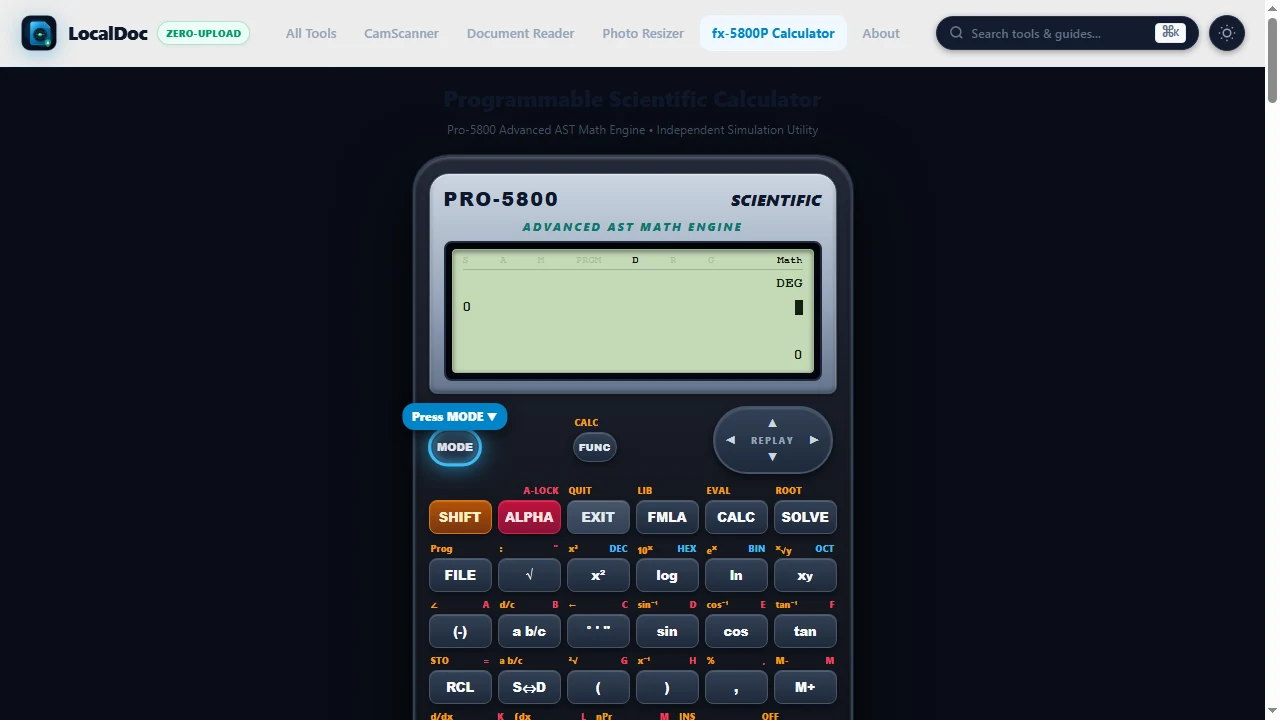
Press the MODE key on the top-left keypad to select between general mathematical calculations (1:COMP), programmer digital logic (2:BASE-N), or program memory (5:PROG). The top status line confirms active angle modes (D, R, G).
Open Program Memory (FILE/Prog) & Enter Casio-BASIC Syntax
Press FILE (Prog) and choose a program memory slot (P1 through P4). Enter tokenized Casio-BASIC expressions using parameter input prompts (?A), statement separators (:), and intermediate output pause operators (?).
Run Program & Input Parameters at LCD Prompts
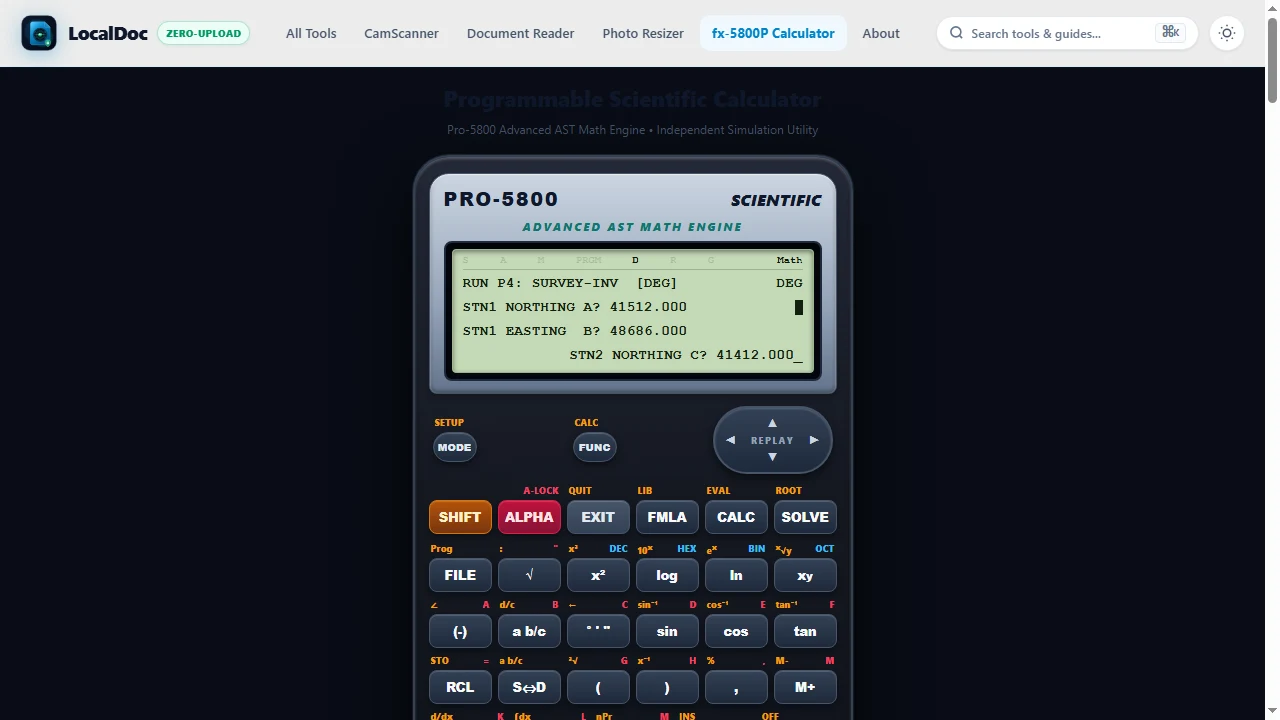
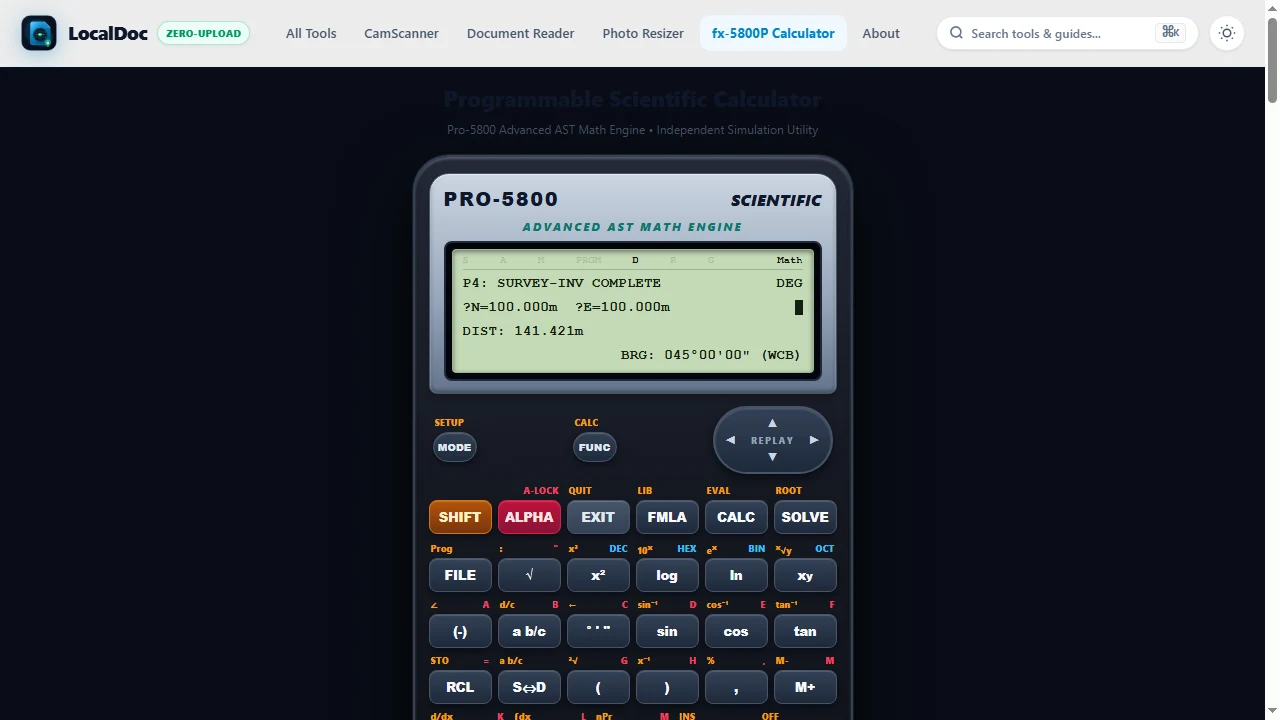
Launch your routine by pressing EXE. The calculator displays interactive field prompts on Line 2 (e.g. STN1 NORTHING A?). Type your measured coordinate and press EXE to store the value into memory register A.
Evaluate Output on 4-Line Dot-Matrix LCD Screen
Read the computed results across Lines 3 and 4 of the dot-matrix screen: horizontal distance is displayed as DIST: 141.421m with a blinking pause operator (?). Pressing EXE advances to the whole-circle azimuth bearing (BRG: 045°00'00").
Execute Base-N Conversions & Bitwise Operations
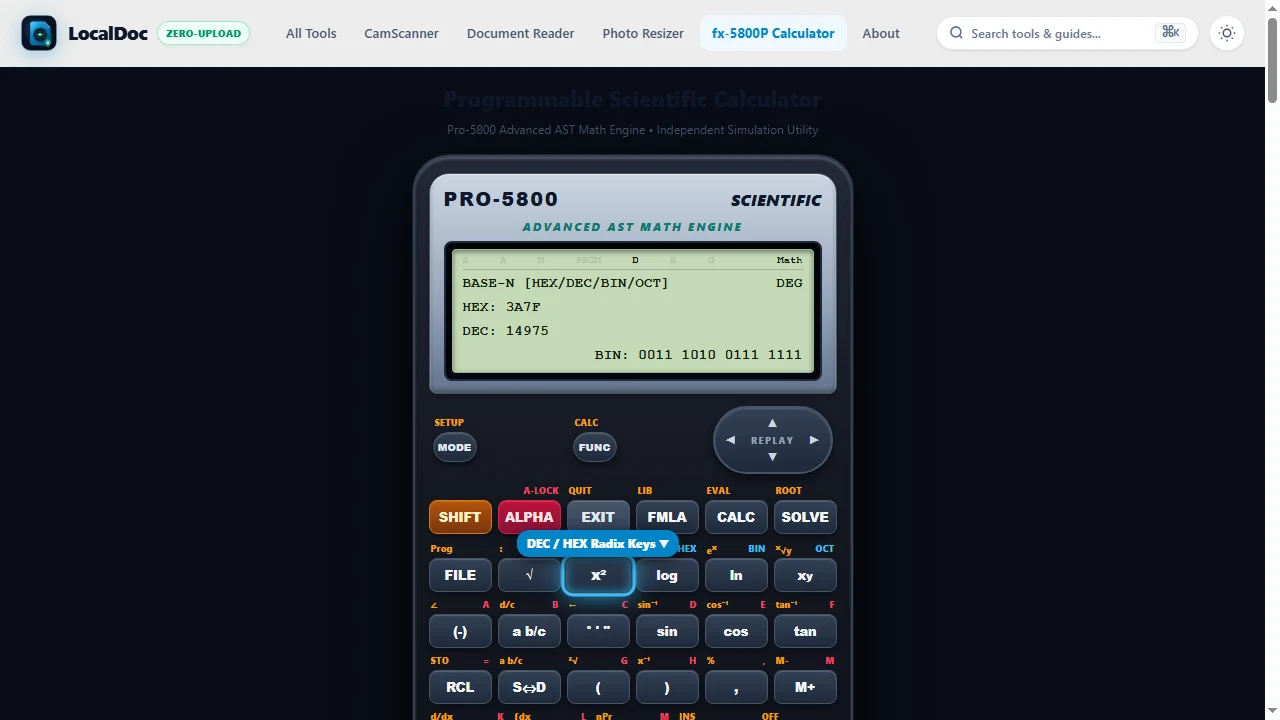
Switch to Base-N mode to convert values across Decimal, Hexadecimal, Binary, and Octal formats with 32-bit two's complement and bitwise logic operations (AND, OR, XOR, NOT).
6. Programmer Base-N Digital Arithmetic
Computer scientists, network administrators, and embedded systems engineers frequently need to work across multiple number systems. In BASE-N mode (press MODE → 2:BASE-N), the fx-5800P functions as a dedicated digital logic workstation:
- Instant Hardware Switching: Press
x —(DEC),log(HEX),ln(BIN), orx?(OCT) to convert active values immediately across bases. - Bitwise Operators: Calculate network subnet masks, IP ranges, and microcontroller bit flags using
AND,OR,XOR,NOT, andNEG. - Two's Complement: Negative binary numbers are represented in standard 32-bit two's complement format.
7. Built-in Engineering Formula Library (FMLA)
Press the FMLA key to open the built-in engineering library. You can evaluate complex parametric equations instantly by inputting variable values on the LCD without writing custom programs:
| ID | Formula Name | Variables | Mathematical Expression |
|---|---|---|---|
| 1 | Quadratic Roots | A, B, C | (-B + v(B — - 4AC)) / (2A) |
| 2 | Kinetic Energy | M, V | — m v — |
| 3 | Coulomb Force | Q, R | (8.98755 – 10? — Q) / R — |
| 4 | Ideal Gas Law | N, T, V | (N — 8.314 — T) / V |
| 5 | Parallel Resistors | A, B | (A — B) / (A + B) |
| 6 | Pythagorean Hypotenuse | A, B | v(A — + B — ) |
| 7 | Civil Grade Slope % | H, L, D | ((H - L) / D) — 100 |
| 8 | Circle Area | R | p — R — |
8. Frequently Asked Questions
Yes! LocalDoc automatically saves all four program slots (P1 – P4) and custom code changes into your browser's persistent localStorage. Your programs will remain available whenever you return, even offline.
Press the MODE button on the top left of the calculator, then press 5 for Degrees (DEG) or 6 for Radians (RAD). The indicator on the top line of the LCD screen will update to D or R.
Land surveyors calculate the coordinate inverse between Station 1 (N1, E1) and Station 2 (N2, E2) by entering Pol(N1-N2, E1-E2). The calculator computes horizontal distance r = √((Δ N)2 + (Δ E)2) and whole-circle bearing θ = atan2(Δ E, Δ N). If θ is negative, adding 360° converts it into clockwise azimuth.
On authentic Casio scientific calculators (including fx-5800P, fx-3650P II, and fx-991EX), Pol(x, y) stores the radius r into variable X and the angle θ into variable Y (accessible via RCL X and RCL Y). Conversely, Rec(r, ?) stores the X-component into variable X and the Y-component into variable Y.
The S?D (Standard to Decimal) button toggles fractions into decimals and vice-versa (e.g. converting 0.75 into 3/4 or 1/3 into 0.33333333).
In standard trigonometric functions, angles south of east/west yield negative degree values between 0° and -180°. Program 4 includes the conditional branch T<0=>T+360?T, which automatically adds 360° whenever an angle is negative, producing whole-circle bearings between 0° and 360°.
Explore Related Guides & Tools
Legal & Trademark Notice:
CASIO® is a registered trademark of Casio Computer Co., Ltd. LocalDoc is an independent engineering platform and is not affiliated with, sponsored by, or endorsed by Casio Computer Co., Ltd.
Engineering Reviews & Experiences (3)
????? 4.95 / 5 (52 Field Reviews)Share Your Calculator Setup or Field Experience
Having Pol(?N, ?E) on-screen in P4 is a life saver for staking out boundary points. I've used the fx-5800P since 2018; having this online backup on my phone via LocalDoc means I never get caught without coordinate inverse capabilities.
The comparison of Base-N 32-bit two's complement arithmetic is spot-on. Students often get confused by negative hexadecimal representation, and your explanation clears up how the high sign bit behaves.
Tested this against my physical Casio fx-3650P II and the calculation outputs match to the exact decimal place. Essential reference guide!