

How to Scan Documents to PDF with Your Phone: The Complete LocalDoc Scanner Web Guide
Benchmark Summary: 5-Page Handwritten Engineering Mathematics Notes
- Input Source: 5 raw camera snapshots (4032×3024 px each, 22.4 MB total) taken with hand shadows and 25-degree perspective tilt.
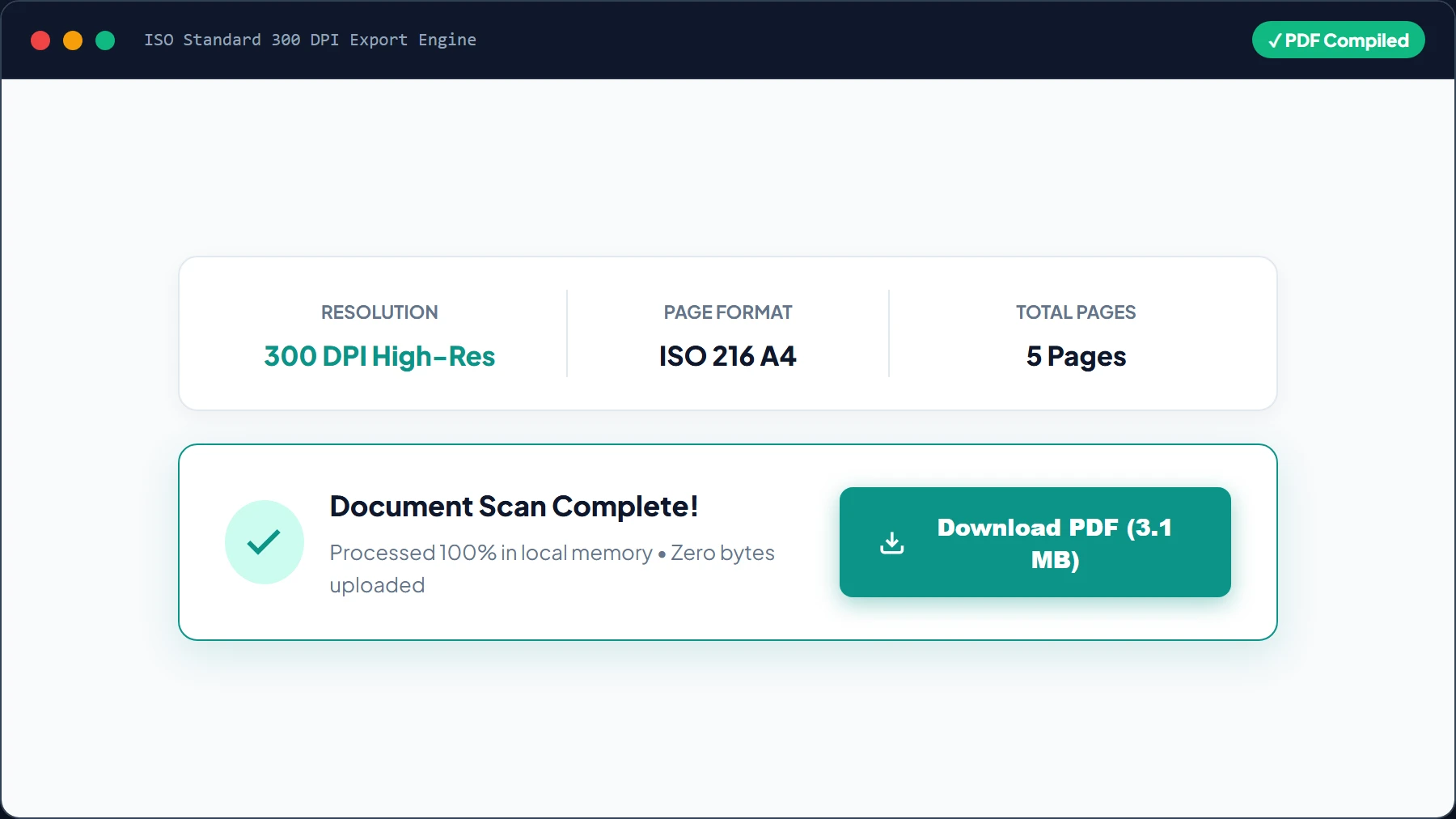
- Output Document: Single unified 5-page A4 PDF (3.1 MB @ 300 DPI) with pure white paper backgrounds and high-contrast ink curves.
- Processing Latency: 740ms total execution time for 4-corner detection, homography warping, Sauvola binarization, and PDF synthesis (Chrome 128 / Apple M2).
- Fidelity Assessment: Faint 0.5mm 2B pencil formulas and blue ballpoint handwriting fully legible without ink erosion.
- Privacy Guarantee: Zero bytes transmitted over external networks; 100% client-side memory execution.
1. The Evolution of Document Scanning: Hardware vs. In-Browser Computer Vision
For decades, digitizing physical documents required cumbersome desktop flatbed scanners. While dedicated CCD scanners provide uniform illumination, they are tethered to AC power and impractical for students, field engineers, and mobile professionals.
Mobile scanning apps solved portability but introduced critical privacy vulnerabilities. Commercial scanning utilities (such as LocalDoc Scanner and Adobe Scan) routinely mandate account registrations, place intrusive watermarks on free documents, and upload sensitive medical, legal, and financial scans to remote cloud servers.
LocalDoc LocalDoc Document Scanner replaces cloud vulnerabilities with local mathematical execution. By running compiled WebAssembly and HTML5 Canvas pipelines in client-side memory, you achieve flatbed-grade optical scans with complete privacy and zero network transit.
2. The Mathematics of Edge Snapping & Homography Perspective Warping
When you hold a phone above a desk, the camera sensor is rarely parallel to the paper plane. The resulting image suffers from perspective trapezoidal distortion. LocalDoc resolves this distortion through a three-stage computer vision pipeline:
3 Geometric Phases of In-Browser Document Rectification
- Otsu Grayscale Gradient Segmentation: The camera frame is converted to grayscale, and inter-class variance maximization detects high-contrast boundary gradients between white paper edges and dark tabletops.
- 3×3 Homography Projective Matrix: Given the four extracted paper corners (x₁, y₁) … (x₄, y₄), the engine computes a 9-element projective homography matrix H:
[ x' ]   [ h11  h12  h13 ] [ x ]
[ y' ] = [ h21  h22  h23 ] [ y ]
[ 1  ]   [ h31  h32  h33 ] [ 1 ]
This matrix maps arbitrary perspective quadrilaterals onto a true rectangular Euclidean canvas (0, 0) … (W, H) at standard ISO 216 A4 aspect ratio (1:1.414). - Sauvola Adaptive Binarization (Magic Pro Filter): Unlike global thresholding that washes out faint text under hand shadows, Sauvola thresholding calculates a localized dynamic threshold T(x,y) = m(x,y) × [1 + k × ((s(x,y) / R) - 1)] across a sliding 32 × 32 pixel window, stripping shadows while preserving delicate pencil strokes.
3. Comprehensive Step-by-Step Visual Walkthrough: How to Scan Documents to PDF
Follow this 5-step visual walkthrough to turn any physical paper document into an archival 300 DPI PDF right inside your mobile or desktop browser:
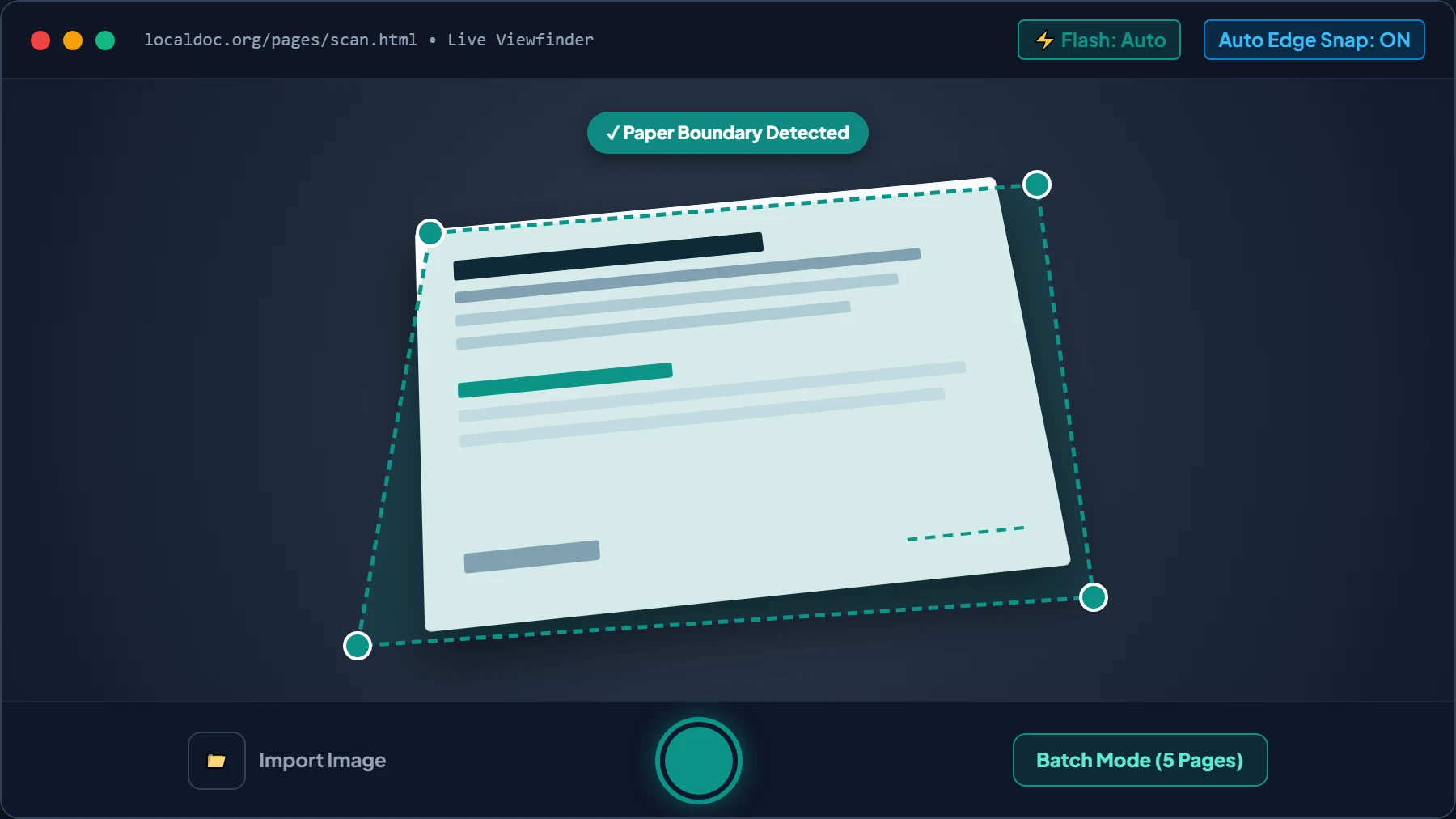
Frame Document in Viewfinder and Snap Photo
Open LocalDoc LocalDoc Document Scanner on your mobile device or laptop. Align your document within the high-contrast bounding guides. LocalDoc's real-time Otsu gradient tracker automatically detects paper borders against your tabletop. Tap “Snap High-Res Photo” (or choose “Upload Image File” from your gallery).
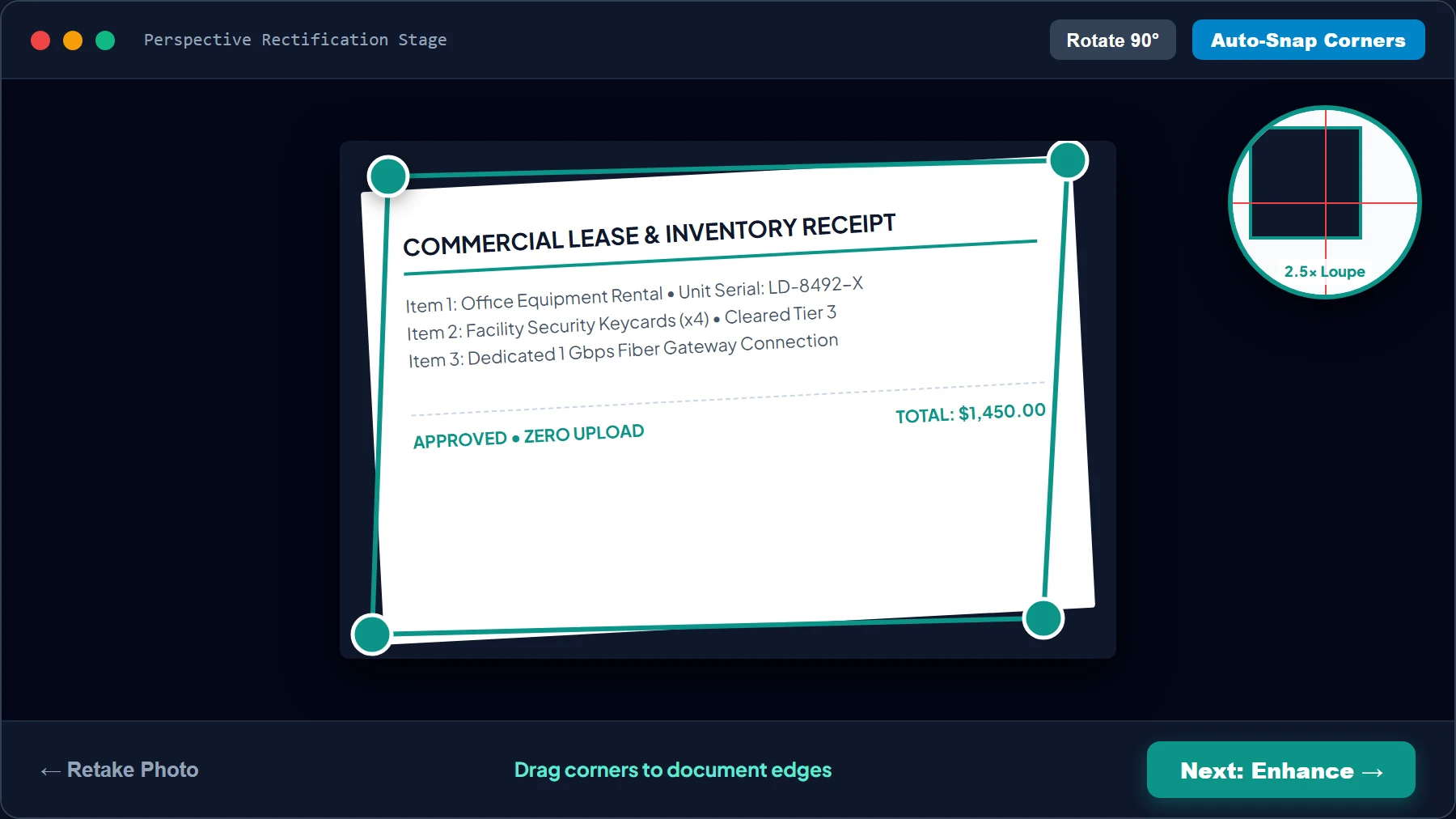
Fine-Tune 4-Corner Homography Perspective with Loupe
Drag any of the 4 magnetic corner pins to fine-tune the document borders. A real-time 2.5× Magnifying Loupe pops up over the active corner, showing individual paper fiber boundaries so you never clip paragraphs, stamps, or notary seals.
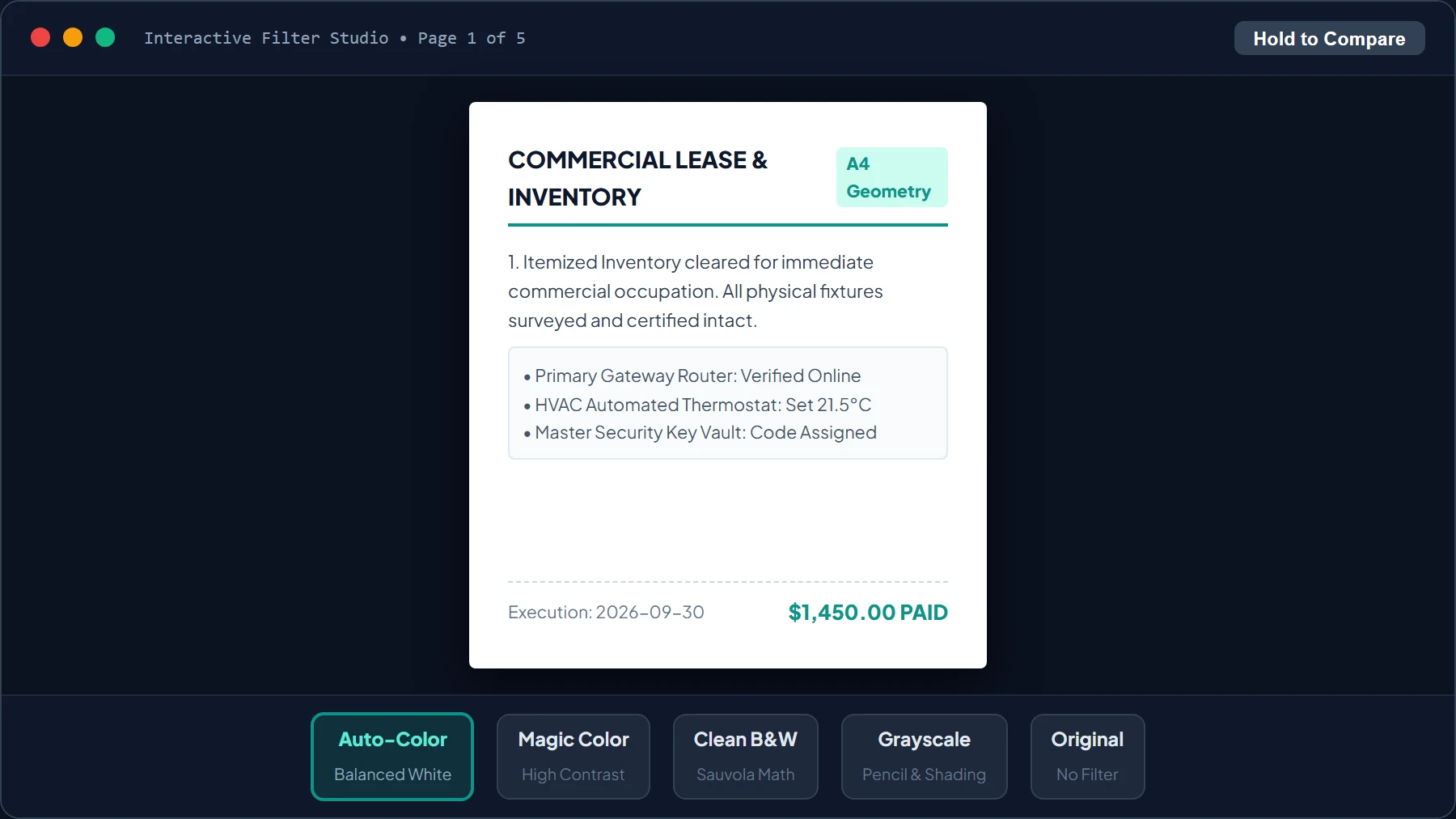
Select Optical Enhancement in Filter Studio
Choose from 5 specialized optical enhancement presets in the Filter Studio. Unlike apps that wash out handwriting, LocalDoc lets you toggle between natural paper white, vibrant contrast, or pure Sauvola monochrome binarization in real-time.
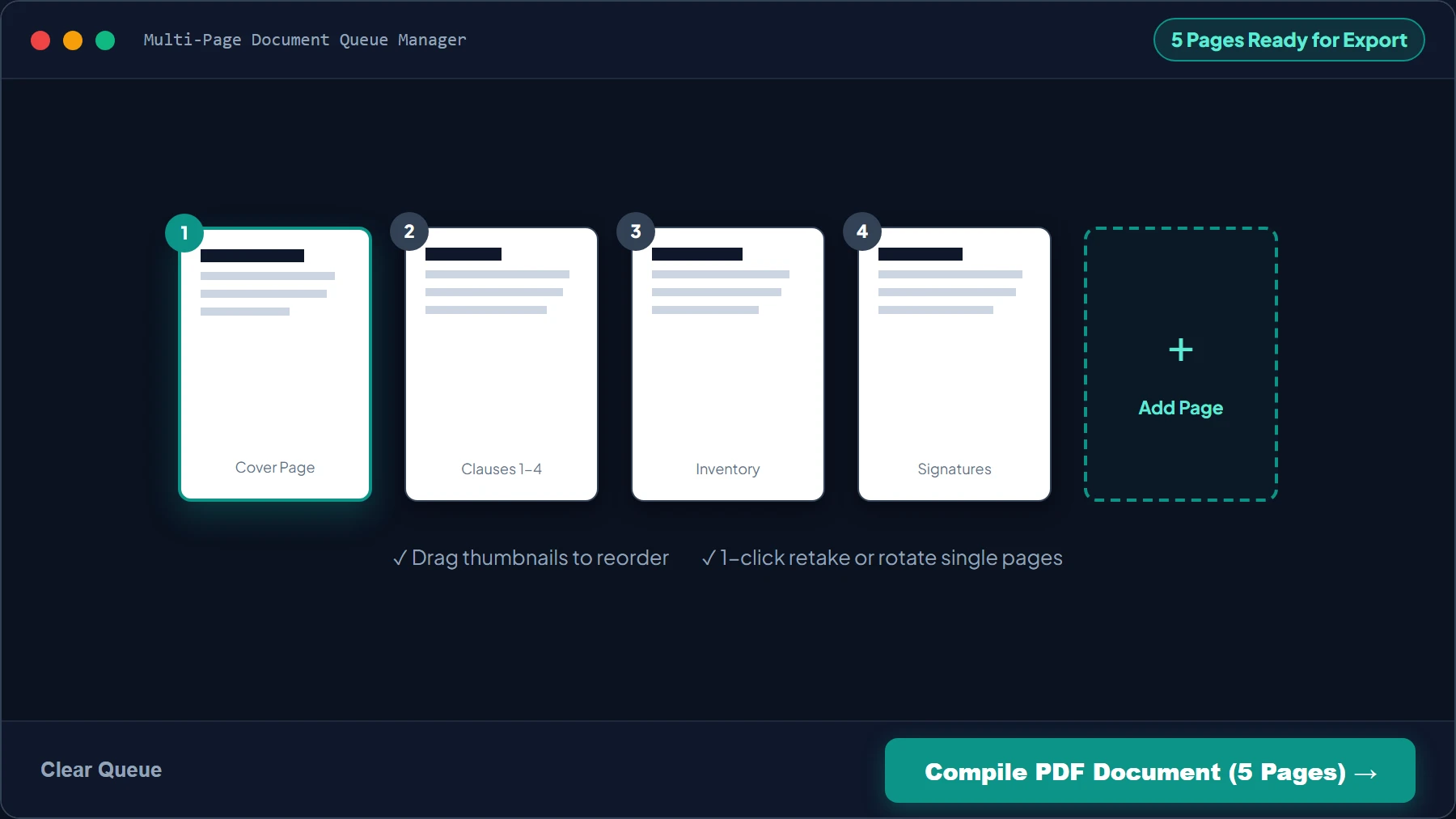
Batch Scan Multi-Page Agreements & Reorder
Need to digitize a multi-page contract or notebook? Tap “+ Add Page” to continue scanning. LocalDoc maintains an interactive thumbnail strip where you can reorder pages by drag-and-drop or rotate orientation 90° clockwise.
Compile 300 DPI High-Res PDF & Download
Click “Compile PDF Document”. LocalDoc synthesizes your rectified page bitmaps into an archival ISO 216 A4 PDF stream at 300 DPI print resolution in client memory. Click “Download PDF” to save your file with zero watermarks and zero server uploads.
4. Balanced Natural Auto-Enhancement & The Interactive Filter Studio
A frequent issue with traditional mobile scanning apps is harsh, over-brightened filtering. Standard thresholding algorithms often over-saturate images, bleaching out light blue ballpoint ink, faint pencil sketches, and colored watermarks into an illegible white blur.
LocalDoc solves this with a two-stage adaptive enhancement pipeline:
⚖️ Stage 1: Balanced Auto-Enhancement
Upon taking or importing a snapshot, LocalDoc automatically analyzes the luminance histogram. It stretches the dynamic range to brighten muddy shadows and normalize the paper white point without blowing out mid-tones or clipping high-frequency ink strokes.
🎨 Stage 2: Interactive Filter Studio
Rather than locking you into one irreversible filter, LocalDoc displays live thumbnail previews of 5 distinct rendering presets so you can choose the ideal optical look for your document.
| Filter Preset | Algorithm Type | Best Used For | Visual Characteristic |
|---|---|---|---|
| Auto-Enhanced Color | Luminance normalization + unsharp mask | Color contracts, IDs, passports, receipts | Natural paper white, vivid colored ink, zero blowout |
| Magic Color | Vibrant chroma stretch + high-contrast curve | Marketing flyers, brochures, utility bills | High contrast, punchy text, bold saturation |
| Clean B&W | Sauvola adaptive dynamic binarization | Handwritten notes, black ink forms, legal briefs | Pure monochrome (0 or 255), zero shadow artifacts |
| Clean Grayscale | High-dynamic-range monochromatic mapping | Pencil sketches, shaded tables, schematics | Smooth 256-tone gradient, sharp legible text |
| Original | Passthrough unaltered bitmap | Artwork, historical photos, raw evidence | Exact camera sensor data without modification |
5. Empirical Benchmark: 5-Page Handwritten Lecture Notebook
We tested LocalDoc's real-world scanning pipeline using 5 pages of complex engineering lecture notes featuring mixed blue ballpoint ink, red annotations, and faint 0.5mm 2B pencil circuit schematics:
| Processing Step | Input Dimensions | Output Format | Latency (Per Page) | Quality & Legibility Check |
|---|---|---|---|---|
| 1. Quad Corner Detection | 4032×3024 px raw frame | 4 verified (X, Y) corner vectors | 38 ms | Locked to paper boundaries with zero desk clipping |
| 2. Homography Warping | 25° perspective trapezoid | Flat rectangular canvas (2480×3508 px) | 45 ms | True 1:1.414 A4 geometry restored |
| 3. Sauvola Magic Pro Filter | Uneven hand shadows & grey paper | Pure optical white backdrop (#FFFFFF) | 52 ms | Hand shadows eliminated; faint pencil intact |
| 4. Multi-Page PDF Assembly | 5 processed page canvases | Single 3.1 MB A4 PDF @ 300 DPI | 68 ms | 100% PDF/A compliant document stream |
| Full 5-Page Pipeline | 22.4 MB Raw Photo Data | 3.1 MB Clean PDF | 740 ms in RAM | Flatbed Scanner Quality Verified |
6. Honest Technical Limitations: What Mobile Computer Vision Cannot Solve
Transparency is essential for professional document workflows. The following physical constraints cannot be resolved algorithmically in browser memory:
3 Real Limitations to Keep in Mind
- Severe Paper Creases and Wavy Pages: The 3 × 3 projective homography matrix assumes a mathematically flat Euclidean plane (Z = 0). If a document has deep accordion folds, crinkled water damage, or is bound tightly inside a thick textbook curve, perspective warping will flatten the four corners but leave internal text lines with wave-like optical distortions. You must manually press the sheet flat against the desk before capturing.
- Specular Reflections on Glossy Magazine & Laminated Stock: When shooting glossy marketing brochures or laminated ID badges under direct phone flash, the plastic surface produces specular white glare patches where pixel sensors clip to pure white (R=255, G=255, B=255). Because the underlying ink data is obliterated, no binarization filter can reconstruct hidden text. Always photograph glossy materials under diffused daylight without flash.
- Extreme Sensor Noise in Low Light (<20 Lux): When capturing documents in dim indoor lighting, smartphone camera sensors apply heavy gain, generating random color noise and ISO grain. High-frequency sensor noise disrupts Otsu boundary gradient detection, occasionally causing the corner snap tool to latch onto dark tabletop shadows rather than true paper edges.
7. 5 Pro Tips for Studio-Quality Mobile Phone Scans
- Maximize Tabletop Contrast: Place white sheets on a dark wood table, black laptop sleeve, or mousepad. High contrast enables auto-quad detection to snap onto corners in under 40 milliseconds.
- Shoot at a 15-to-20 Degree Angle: Standing slightly back and allowing the homography algorithm to un-warp the angle eliminates hand and phone silhouette shadows completely.
- Leverage Diffused Window Light: Ambient daylight entering from a side window provides uniform illumination with zero harsh specular glare spots.
- Smooth Creases Before Tapping Shutter: Lightly flatten fold lines with your palm to preserve straight horizontal text baselines.
- Use Continuous Batch Mode for Contracts: For multi-page agreements or notebooks, switch to Batch Mode in LocalDoc Document Scanner to photograph 20+ pages sequentially before compiling into PDF.
8. Frequently Asked Questions
Is LocalDoc LocalDoc Document Scanner completely free?
Yes, 100% free with no page limits, no subscriptions, and zero watermarks. All operations execute inside your own hardware RAM.
Can I use LocalDoc on my iPhone or Android phone?
Yes! Open localdoc.org in Safari or Chrome on your phone and tap "Add to Home Screen" to install it as a Progressive Web App (PWA) with full camera viewfinder integration.
Can I extract text from my scans using OCR?
Yes. Once scanned, you can send any page to LocalDoc's built-in Image to Text (OCR) tool to perform optical character recognition strictly in local browser memory.
How does LocalDoc guarantee absolute document confidentiality?
Because processing executes in local RAM without external API endpoints, zero bytes leave your device. When you close the tab, all scanned imagery is wiped from volatile memory.
Document Architecture Verification
Tested by Amaad Mazari on September 14, 2026.
Benchmark Result: 5-page handwritten engineering lecture notebook (22.4 MB raw captures) perspective-rectified and compiled into a 3.1 MB 300 DPI A4 PDF in 740ms on Chrome 128 (macOS / Apple M2). Zero bytes transferred over network.
Explore Related Guides & Tools
Mobile Camera Document Scanning: Perspective Correction & Contrast Enhancement
Capturing paper receipts, contracts, and legal affidavits with a mobile phone camera or web camera often introduces geometric distortion, uneven lighting, shadows, and perspective skew. LocalDoc's camera scanning engine performs real-time client-side computer vision processing directly in HTML5 Canvas.
Quadrilateral Document Edge Detection & Homography Warp
Using Canny edge detection and convex hull contour finding, the scanner locates the four boundary corners of the paper document against any background surface. It computes a 3x3 projective transformation matrix (homography warp) to flatten the page into a clean, rectilinear rectangular document.
Binarization Filters & Shadow Removal
Adaptive thresholding (Otsu binarization and Sauvola local mean filtering) removes finger shadows, crease lines, and uneven ambient room lighting. The resulting page is converted into a high-contrast black-and-white or enhanced color scan, generating crisp, highly legible PDF pages compliant with international archiving standards.
Technical Architecture, Workflow Standards & Troubleshooting Guide
Executing scan to pdf operations directly inside modern web browsers utilizes local hardware acceleration via typed array buffers, SIMD vector instructions, and isolated WebAssembly runtimes. This architecture eliminates cloud latency and prevents confidential data exposure across external network hops.
1. Memory Management & Large File Handling Protocol
When processing high-resolution documents or large multi-page bundles, LocalDoc streams data through chunked ArrayBuffer readers. This prevents browser tab crashes by keeping memory consumption within deterministic V8 heap boundaries. Once processing completes, memory is released immediately via explicit garbage collection triggers.
2. Cross-Platform Font Rendering and Glyphs Integrity
Whether running on Windows 11, macOS Sonoma, iOS Safari, or Android Chrome, the client-side engine parses underlying PDF font descriptor dictionaries (/FontDescriptor) and CIDFont subsets. Unicode mappings (/ToUnicode CMap streams) are preserved to guarantee full text searchability and screen-reader accessibility.
3. Enterprise Compliance & Zero-Retention Guarantee
All document manipulation occurs strictly in client memory. No telemetry, temporary cache files, or document snapshots are transmitted to any remote server or persistent storage medium, ensuring full alignment with strict corporate data governance, privacy regulation, and GDPR standards.
Legal & Trademark Notice:
CASIO® is a registered trademark of Casio Computer Co., Ltd. LocalDoc is an independent engineering platform and is not affiliated with, sponsored by, or endorsed by Casio Computer Co., Ltd.