
Scientific Calculator Keypad Layout & Symbols: What HYP, MR, ENG & Power Keys Mean
Demystify every obscure button and symbol on Casio, Texas Instruments, and Sharp scientific calculators. Learn what HYP, MR, ENG, S⇔D, power exponents (xy), memory registers, and statistical symbols actually do with real student and engineering examples.

🧮 Test All Keys On-Screen Right Now
Open the free LocalDoc Casio fx-5800P online simulator with real-time SHIFT, ALPHA, ENG, and Base-N switching.
1. The Most Misunderstood Calculator Keys Explained
Modern scientific calculators pack up to 450 distinct functions into just 50 physical plastic keys. To fit this immense mathematical power into a handheld shell, manufacturers use three distinct visual layers: Primary print (on the key face), Yellow/Amber print (activated via SHIFT), and Red/Pink print (activated via ALPHA).
Fast Answers: The 5 Most Searched Mystery Buttons
Looking up a specific symbol during homework or exam prep? Here are the exact definitions for the most frequently searched calculator keys:
Stands for Hyperbolic (sinh, cosh, tanh), an advanced trigonometry branch used in university engineering. UK Year 7–11 Students: You do not need this for GCSE exams! Casio uses one shared chip for school and university models, so you can safely ignore this button.
MR = Memory Recall (displays your saved subtotal). M+ adds the screen number into memory; M- subtracts it; MC resets memory to zero. Keeps running totals without retyping.
Raises any base to an exponent. On Casio it is [x^■]; on Texas Instruments (TI-30X, TI-84) it is the caret [^]. Type your base number → press the power key → type exponent → press EXE/equals.
Stands for Engineering Notation. Adjusts scientific exponents into steps of 3 (103, 106, 10-3, 10-6), matching SI units (kilo, mega, micro, nano). SHIFT + ENG steps it backwards.
Found in STAT mode. The Greek Sigma (Σ) calculates the total sum of all values (∑ x). The bar symbol (x̄) calculates the arithmetic average (mean) of all entered statistical data.
Visual Walkthrough: How to Master Mystery Calculator Keys (HYP, MR, ENG & Powers)
Follow this 5-step visual walkthrough to understand hyperbolic trigonometry, manage independent memory accumulators, compute universal powers, and toggle engineering prefixes on the LocalDoc Scientific Calculator Simulator:
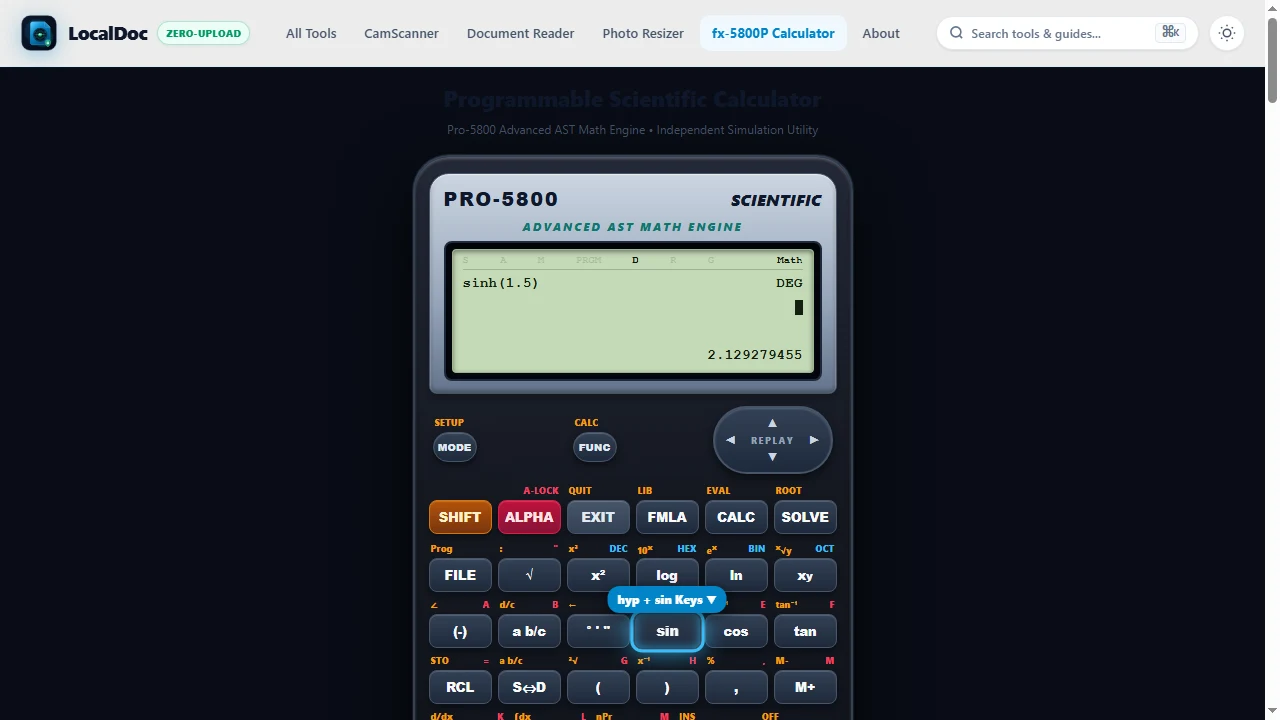
Understand the [hyp] Key & Why School Students Can Ignore It
The hyp button invokes hyperbolic functions (&sinh;, &cosh;, &tanh;) used in higher-level engineering to calculate suspension bridge catenary curves. UK Year 7–11 & US Middle/High School Students: You do NOT need this button for GCSE exams! Casio uses one standardized hardware chip for school and university calculators, so you can safely bypass it.
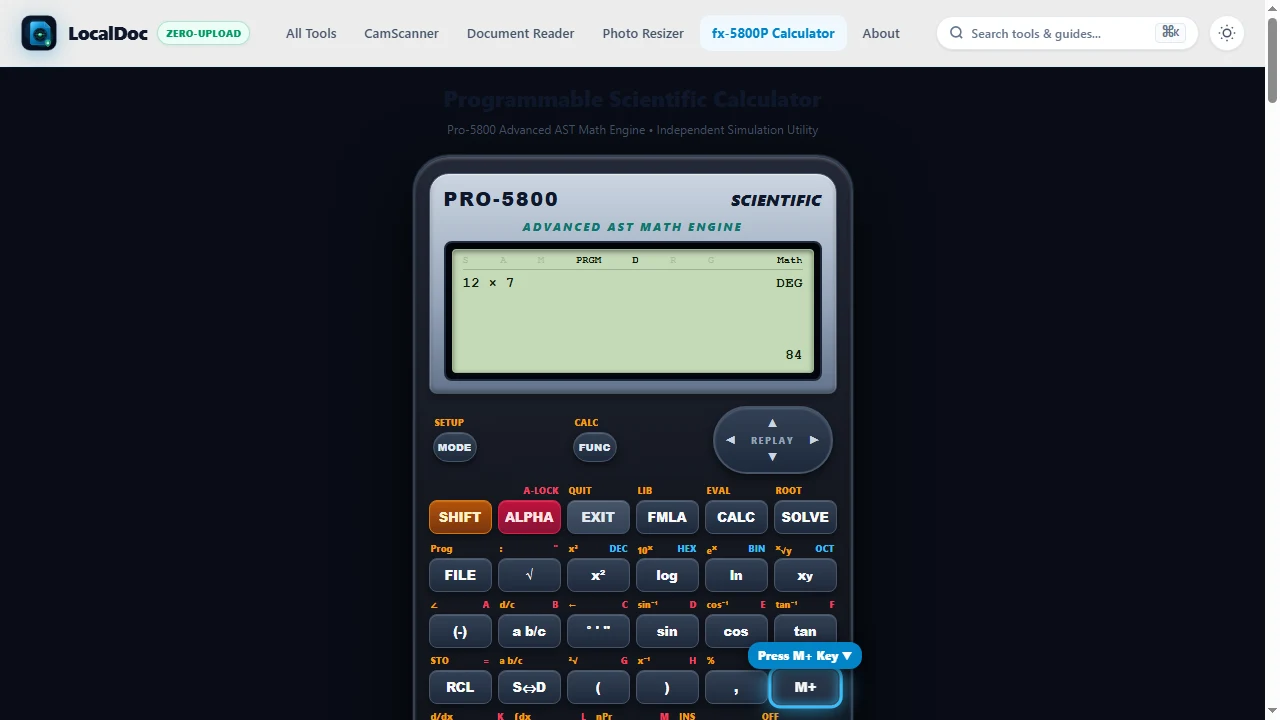
Store & Recall Accumulators with [M+], [M-], [MR], and [MC]
Solve multi-step financial or geometry problems without retyping intermediate numbers: calculate your first term and tap M+ to store it into memory. Calculate the second term and tap M+ to accumulate. Press MR (Memory Recall) to display your running total instantly.
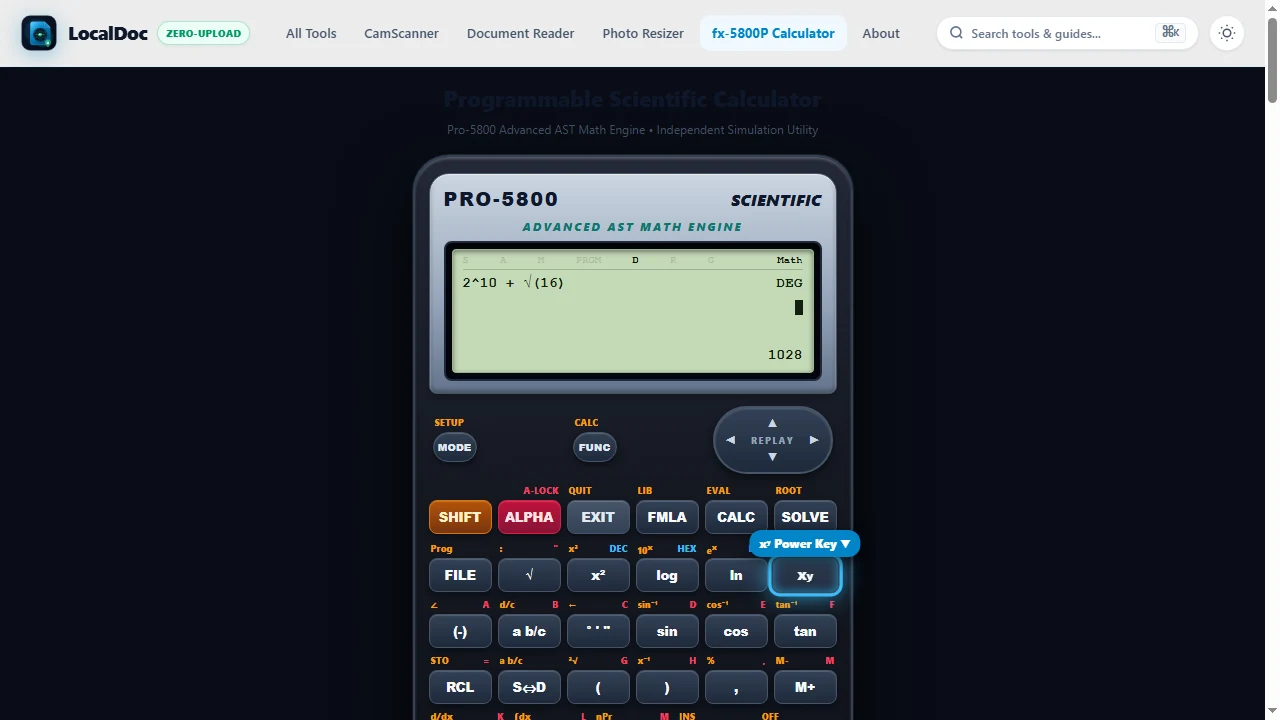
Calculate Universal Exponents via [x^■], [^], and [x^y]
Raise any base to an arbitrary integer, decimal, or fractional power. On Casio calculators, tap the x^■ key; on Texas Instruments or Sharp calculators, tap ^ or x^y. Enter base 16, tap x^■, enter 0.5, and press equals to compute √16 = 4.
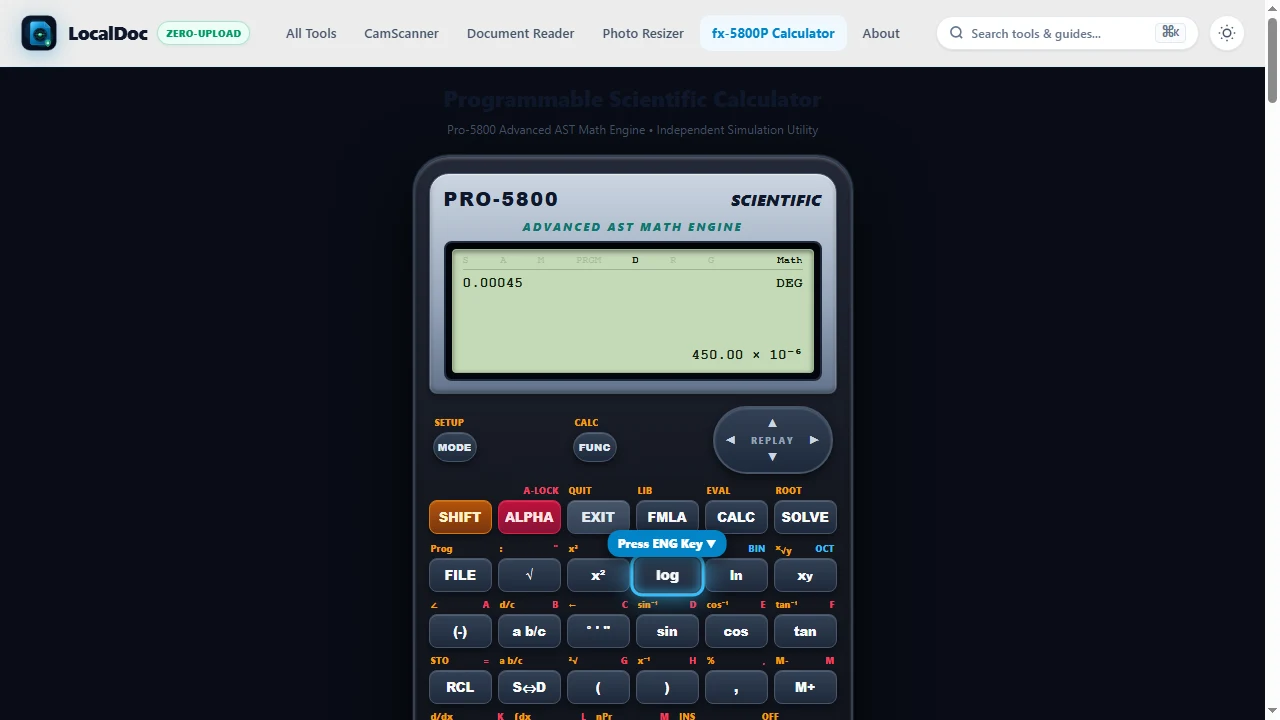
Align Exponents to Metric SI Prefixes with [ENG] Key
Tap the ENG button to automatically adjust standard scientific notation into exponents that are strict multiples of 3 (103, 106, 10-3, 10-6), converting 0.000450 into 450.00 × 10⁻⁶ (450 μm) to match electrical engineering SI metric prefixes (kilo, mega, micro, nano).
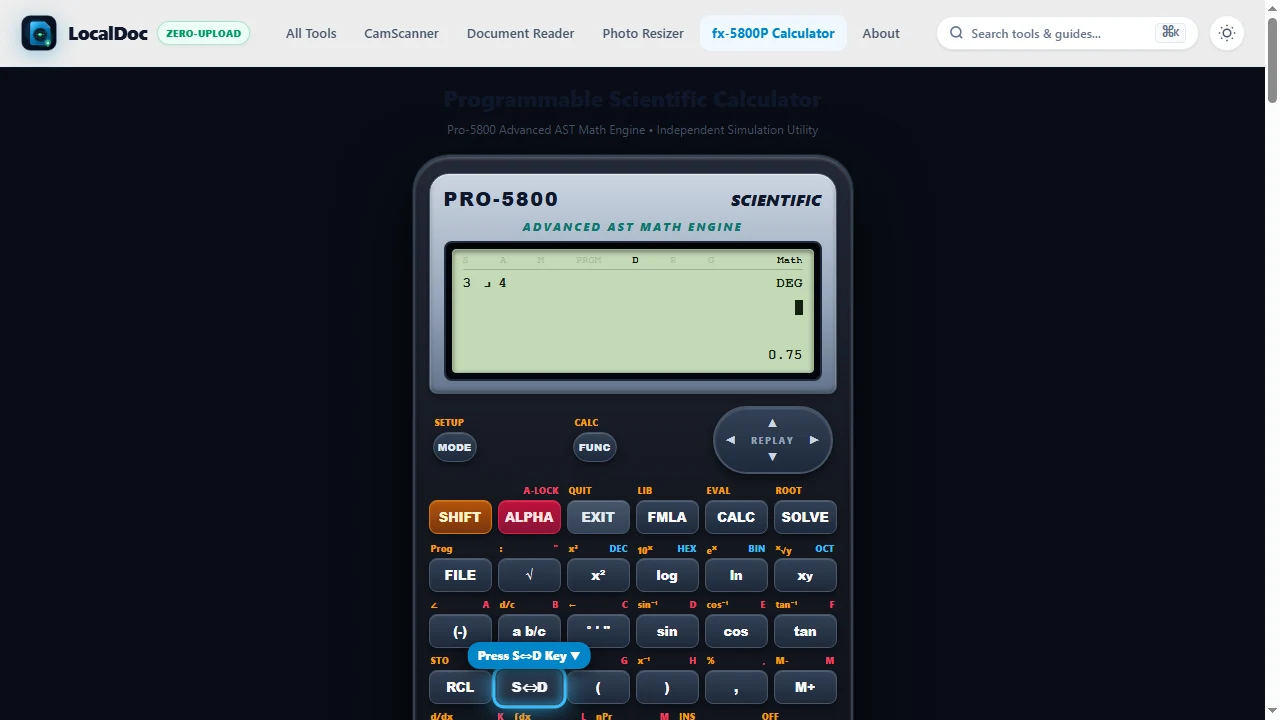
Toggle Exact Fractions and Decimal Approximations via [S<=>D]
Press the S⇔D (Standard to Decimal) key to toggle your displayed answer between exact algebraic fraction/radical notation ( rac{3}{4}, √2) and decimal approximations (0.75, 1.41421), preventing rounding errors during intermediate homework steps.
Engineering Notation
Adjusts the scientific exponent to the nearest multiple of 3 (103, 106, 10-3, 10-6), matching standard SI engineering units like kilo, mega, micro, and nano. Pressing SHIFT + ENG shifts the exponent backwards.
Memory Recall & Independent Accumulator
MR recalls the value stored in the M memory register. M+ adds the displayed number into memory; M- (via SHIFT + M+) subtracts it. MC or 0 → STO → M clears it. An "M" indicator appears on the top LCD line when memory contains data.
Power & Universal Exponent
Raises any base number to any power, fraction, or decimal exponent. Casio models use x^■ (natural textbook display), while Texas Instruments and Sharp models use the caret ^ or x^y.
Standard to Decimal Toggle
Instantly converts the displayed output between exact textbook fractions or radicals (3⁄4, √2, π⁄2) and floating-point decimal approximations (0.75, 1.414, 1.570).
Hyperbolic Trigonometry
Invokes hyperbolic functions (sinh, cosh, tanh) and their inverses (sinh-1, cosh-1, tanh-1). Essential in university physics and civil engineering for catenary sag curves. Note for UK Year 7–11 students: this key is not required for GCSE maths.
Statistical Summation & Mean
Accessed in STAT mode (via SHIFT + 1 on Casio). Σx outputs the total sum of numbers in your list, Σx² calculates the sum of squares, and x̄ produces the exact statistical sample mean.
Polar & Rectangular Conversion
Pol(x, y) converts rectangular coordinates into polar radius r and angle θ. Rec(r, θ) does the opposite, converting magnitude and bearing into orthogonal X and Y coordinates. Used in land surveying for distance and azimuth.
Store & Recall Memory Registers
STO [A-Z] permanently saves the active calculation result into internal non-volatile memory. RCL [A-Z] pastes that exact numerical value back onto the screen in future calculations without rounding errors.
Permutations & Combinations
nPr computes permutations (number of ordered arrangements of r items from n). nCr computes combinations (number of subsets where order does not matter, such as lottery odds or structural truss combinations).
Numerical Calculus Engine
Evaluates the numerical derivative of an algebraic expression at a specific point x = c using central finite differences, or calculates definite integrals over an interval [a, b] using Gauss-Kronrod numerical quadrature.
Answer History Buffers
Ans stores the output of the most recent calculation. PreAns stores the calculation immediately prior to that, allowing you to compute iterative recursive recurrence relations without losing earlier numbers.
1.5 UK Year 7–11 GCSE & Key Stage 3 Maths Essentials
In the United Kingdom, secondary schools (Years 7 through 11) and GCSE examination boards (Edexcel, AQA, OCR) mandate standard scientific calculators. Because Casio manufactures unified microchips across school and university hardware, student keypads contain dozens of intimidating buttons. Here is what you actually need:
✅ The 5 Keys You MUST Know for Exams
- [■/□] Fraction Key: Enters exact fractions. Press
SHIFT + [■/□]to enter mixed numbers like 2 3⁄4. - [S⇔D] Standard-to-Decimal: Converts fraction results (e.g., 17⁄25) to decimals (0.68). Never write fractions on money questions!
- [(] and [)] Brackets: Enforces BIDMAS. Mandatory for negative numbers squared:
(-3)² = 9, whereas-3² = -9. - [√] Square Root: Computes radicals. Press
SHIFT + [√]to trigger cube roots (³√□). - [Ans] Previous Answer: Carries exact decimal numbers into the next calculation step without rounding errors.
⚠️ Buttons UK Students Can Safely Ignore
- [hyp] Hyperbolic Trig: College-level physics only. Not tested anywhere in Key Stage 3 or GCSE Higher/Foundation Maths.
- [Pol(] and [Rec(]: Polar to rectangular coordinate conversions. Used in land surveying, not GCSE geometry.
- [ENG] Engineering: Electrician and engineering powers of 3 (103, 106). Normal scientific notation uses
[x10^x]. - [d/dx] and [∫dx]: Numerical calculus. Exclusively taught in A-Level Further Maths and university courses.
If your screen shows strange letters like STAT, M, FIX, or gives weird trigonometry numbers, do this 3-second reset:
[SHIFT] → [9:CLR] → [3:All] → [= :Yes] → [AC]. This restores standard COMP mode and Degree (D) display.
1.6 US High School & College Entrance Guide (SAT, ACT, AP Math)
In American middle and high schools, college entrance exams (Digital SAT, ACT, and AP Calculus/Statistics) predominantly feature Texas Instruments (TI) calculators. Here are the critical differences from Casio:
1.7 The Master Symbol & Keystroke Practice Matrix
Every printed symbol on a scientific calculator represents a time-saving mathematical shortcut. Use this quick reference matrix and worked keystroke sequences for homework, lab measurements, and standardized tests:
2. Understanding the 7 Core Calculation Modes
Pressing the MODE or SETUP key opens the hardware operating system menu. Many students get stuck because their calculator is accidentally left in the wrong mode (such as STAT or RAD). Here is what each mode does:
- 1: COMP (Computation): Standard general arithmetic, trigonometry, calculus, and scientific functions. Use this for 90% of everyday work.
- 2: STAT (Statistics): 1-variable and 2-variable linear, logarithmic, and exponential regression analysis (bar{x}, σ, sum x, r).
- 3: BASE-N (Digital Logic): 32-bit two's complement integer arithmetic across Decimal (DEC), Hexadecimal (HEX), Binary (BIN), and Octal (OCT) with bitwise operators (AND, OR, XOR, NOT).
- 4: EQN (Equation Solver): Built-in solver for simultaneous 2-unknown and 3-unknown linear systems, as well as 2nd and 3rd degree polynomial equations.
- 5: MATRIX: Perform matrix addition, scalar multiplication, transposition, determinants, and inversion up to 3 × 3 matrices.
- 6: VECTOR: 2D and 3D vector arithmetic, dot products, cross products, and magnitude normalization.
- 7: TABLE: Generates numerical function tables f(x) for graphing over a user-defined range [start, end, step].
For programmable formulas, 3x3 matrix inversions, and surveying coordinate geometry (COGO), read our complete companion deep-dive: Pro Scientific Calculator & Formula Solver Guide →
3. Degrees (D), Radians (R), and Gradians (G)
The single most common reason for getting wrong answers on exam calculations is having the angle unit set incorrectly. Look at the top line of your LCD screen:
Full circle = 360°. Used in mechanical design, geometry, surveying, and civil engineering. sin(30°) = 0.5.
Full circle = 2π radians. Mandatory in calculus derivatives (d/dx) and integrals (∫dx). sin(π / 6) = 0.5.
Full circle = 400 gon (right angle = 100 gon). Used in French and European geodesy and land surveying.
Frequently Asked Questions (FAQ)
STAT mode) and calculus, the capital Greek letter Sigma (Σ) calculates the summation of all data points or mathematical series. The symbol x̄ (x with a horizontal bar on top) represents the arithmetic sample mean (average) of all entered values.
Explore Related Engineering Guides & Tools
Legal & Trademark Notice:
CASIO® is a registered trademark of Casio Computer Co., Ltd. LocalDoc is an independent engineering platform and is not affiliated with, sponsored by, or endorsed by Casio Computer Co., Ltd.
Keypad Questions & Answers (3)
Community Q&AAsk a Question About a Calculator Key or Function
I never knew what the ENG key did until now! It saves me so much time converting circuit capacitances into microfarads and picofarads. The explanation of SHIFT + ENG shifting exponents backwards is brilliant.
Finally someone explained the S⇔D button clearly. In exams I always panicked when answers came out as fractions like 17/83 instead of decimals. One press of S⇔D converts it immediately!
Great breakdown of the Pol( and Rec( keys. Many students don't realize that Pol automatically stores the radius into register X and angle into register Y. Excellent resource for classroom distribution.