Privacy Policy & Data Protection
Zero-Knowledge Architecture Summary
- 0 Bytes Server Document Data Transit: We do not operate file upload servers. Your files never touch our network.
- Local Browser Memory Sandbox: All parsing, text extraction, OCR, and vector PDF compilation happen inside your browser's private memory.
- No Data Harvesting: We do not retain, copy, inspect, or sell your documents or personal files.
1. The Fundamental Zero-Upload Architecture
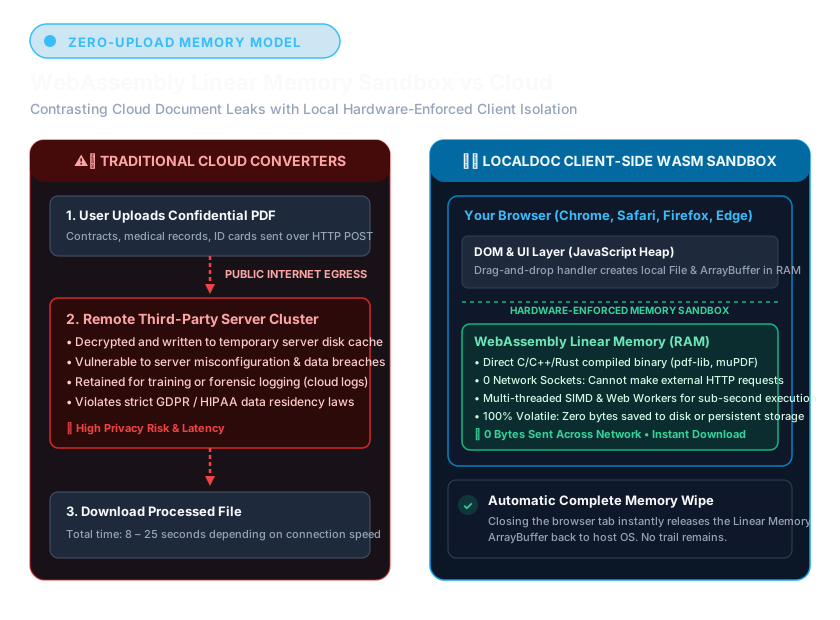
Traditional PDF utilities require sending your files to a backend web server over HTTPS. At that point, you must trust the service provider's privacy policy, their retention period, their employee access controls, and their vulnerability to external cyberattacks.
LocalDoc operates on a Zero-Trust Client-Side Architecture. Instead of sending your document to our code, our code is sent once to your browser. Your local CPU and GPU execute all computations locally inside your browser tab.
2. What Information We Do (and Do Not) Collect
Files and Documents: When you open a PDF, Word document, Excel spreadsheet, or photo in LocalDoc, that file is loaded strictly into your browser's local memory (RAM). It is never transmitted across the network, stored on a remote server, or reviewed by any human or AI model.
Technical Logs & Analytics: To ensure website uptime and optimal performance, standard aggregated web server logs (such as browser type, referring URL, and page request counts) may be collected. These technical logs contain no personal document data.
3. Third-Party Advertising & Cookies Policy
To keep LocalDoc 100% free and accessible to all users worldwide without subscriptions, we may display third-party advertisements on non-tool informational pages.
Google AdSense & DoubleClick DART Cookie:
- Google, as a third-party vendor, uses cookies to serve ads on our site.
- Google's use of the DART cookie enables it to serve ads to users based on their visit to our site and other sites on the Internet.
- Users may opt out of the use of the DART cookie by visiting the Google Ad and Content Network Privacy Policy.
- Third-party ad servers or ad networks use technologies like cookies, JavaScript, or Web Beacons in their respective advertisements and links that appear on LocalDoc. They automatically receive your IP address when this occurs. LocalDoc has no access to or control over these cookies used by third-party advertisers.
4. GDPR & CCPA/CPRA Compliance Rights
Under the European General Data Protection Regulation (GDPR) and the California Consumer Privacy Act (CCPA/CPRA), users enjoy specific data sovereignty rights. Because LocalDoc operates without user accounts, databases, or document ingestion servers, your data is inherently protected by design.
- Right of Access & Deletion: Because all documents exist only in your device's RAM, closing your browser tab permanently purges all processing artifacts instantly.
- Right to Non-Discrimination: We provide equal, unrestricted access to all tools for all users globally.
5. Zero Data Retention Policy (Immediate Memory Flush)
LocalDoc operates under a strict Zero-Persistence Data Retention Standard:
- Retention Period: Exactly 0 Milliseconds. Document buffers, parsed PDF streams, raster image bitmaps, and spreadsheet matrices exist exclusively in your computer's temporary Random Access Memory (RAM) for the duration of the active calculation or export routine.
- Zero Server-Side Storage: We operate no file intake endpoints, Amazon S3 buckets, Google Cloud Storage instances, or staging databases. Your data is physically incapable of being retained on our servers because it never traverses the internet to reach them.
- Deterministic Destruction: As soon as you close your browser tab, refresh the page, or clear the tool workspace, your operating system and web browser immediately reclaim the allocated memory heap through standard garbage collection routines. No persistent document artifacts remain on your disk or in your cache.
6. Children's Privacy Protection (COPPA & GDPR-K Compliance)
Protecting the privacy of young internet users is of paramount importance to LocalDoc. We fully comply with the Children's Online Privacy Protection Act (COPPA) in the United States and Article 8 of the General Data Protection Regulation (GDPR-K) in the European Union and United Kingdom:
- LocalDoc is an unauthenticated productivity platform that does not require user registration, usernames, email addresses, phone numbers, or birthdates.
- We do not knowingly solicit, collect, profile, or retain personally identifiable information (PII) from children under the age of 13 (or under the age of 16 within the EEA/UK).
- Because all document rendering, photo sizing, and mathematical problem-solving execute 100% on the client's local device, student homework, classroom assignments, and educational identity cards processed by minors are never harvested or stored.
- If a parent or legal guardian has questions regarding their child's interaction with the Platform, please contact our privacy compliance team at privacy@localdoc.org.
7. Cookie & Client-Side Storage Policy
LocalDoc utilizes a minimal, transparent storage footprint designed to respect user autonomy:
- Essential Local Storage: We use your browser's native
localStorageAPI solely to preserve functional client-side preferences (such as your chosen Dark/Light theme mode and language preference). These key-value pairs never leave your browser and contain zero tracking telemetry or personal identifiers. - Google Consent Mode v2 & AdSense Compliance: Our platform implements Google Consent Mode v2. All analytics and advertising storage parameters (
analytics_storage,ad_storage,ad_user_data,ad_personalization) are set todeniedby default until the user explicitly selects "Accept All". Users maintain complete autonomy to browse with essential storage only. - Google Analytics 4 with IP Anonymization: For basic site telemetry and aggregated performance diagnostics, Google Analytics 4 operates with automatic IP masking and anonymization. No personal identifiable information (PII) or document content is ever accessible to or recorded by analytics services.
- Browser Controls: You can configure your browser to reject all cookies or notify you when a cookie is placed. Deleting your browser cache or cookies will not impair the core client-side functionality of any LocalDoc utility.
8. How to Verify Zero-Upload Privacy Yourself
We believe in verifiable security rather than blind trust. You can independently confirm that LocalDoc never transmits your files by following these steps:
- Open LocalDoc in Google Chrome, Microsoft Edge, Mozilla Firefox, or Apple Safari.
- Press
F12or right-click anywhere on the page and select Inspect to open Developer Tools. - Click on the Network tab.
- Drop a large PDF or photo into any tool and click process.
- Observe the Network activity: you will see 0 outbound POST or PUT requests containing your file data.
9. Embed the 'Certified Zero-Upload' Trust Badge on Your Site
Are you a developer, university, accounting firm, or legal practice using LocalDoc? Embed our verified trust badge on your website, intranet, or GitHub repository to assure your users of 100% private document processing:
 (Live SVG Badge Preview)