

How to Extract Text from Images & Receipts with Neural WebAssembly OCR
Critical Architectural Takeaways
- Zero Network Exposure for Confidential Records: Extracting text from medical bills, prescription receipts, and tax records must never route raw image bitmaps through public cloud vision APIs.
- Client-Side Neural Inference: LocalDoc executes a compiled Tesseract 5 WebAssembly binary utilizing integer-quantized LSTM neural networks directly inside browser thread pools.
- Adaptive Computer Vision Pre-Processing: Sauvola local binarization dynamically calculates per-pixel thresholds, rescuing faded ink on thermal paper that standard global Otsu thresholding obliterates.
- Structured Output Generation: The engine generates structured plain text, bounding box coordinates, and per-word confidence metrics in local memory without transmitting a single byte.
1. The Privacy Dilemma of Cloud Computer Vision
Optical Character Recognition (OCR) has advanced into deep neural networks capable of recognizing distorted text. However, this progress introduced a severe privacy flaw: commercial OCR tools operate as centralized cloud APIs. Uploading a hospital bill, pharmacy receipt, or tax filing transmits raw images to remote data centers, storing files on shared disks vulnerable to tracking and subpoenas.
For patients, attorneys, and accountants, uploading photographic documents violates privacy regulation, GDPR, and nondisclosure agreements. A pharmacy receipt reveals patient names, medical record numbers, and prescription dosages. LocalDoc resolves this by compiling neural character recognition directly into WebAssembly, running inference entirely inside local device RAM.
2. In-Browser Neural Architecture: Tesseract 5 in WebAssembly
Running optical character recognition inside a web browser without servers requires high-performance optimization. LocalDoc leverages a custom build of the Tesseract 5 OCR engine, compiled into WebAssembly (Wasm) with SIMD vector acceleration and Web Workers.
The engine employs a Line-Based Long Short-Term Memory (LSTM) Recurrent Neural Network:
- Connected Component Analysis: Detects continuous pixel clusters and groups them into candidate typographic baselines.
- Line Normalization: Normalizes text lines to a fixed vertical height (typically 48 pixels), correcting for skew and irregular baselines.
- Sequential LSTM Scoring: Evaluates horizontal slices of text lines sequentially, calculating probability distributions across language character sets.
- Beam Search Decoding: Resolves ambiguous glyphs (distinguishing '0' from 'O') based on contextual vocabulary frequencies.
3. Adaptive Pre-Processing: Sauvola Binarization vs Otsu Thresholding
Mobile phone cameras capture uneven lighting, shadows, and crumpled textures. Thermal cash register receipts also suffer from chemical fading, fingerprints, and poor contrast between gray paper and light ink.
Standard image tools rely on global Otsu thresholding, which calculates a single cutoff value for the whole image. If a shadow crosses the lower half, Otsu converts the shadowed area into solid black pixels, destroying text readability.
LocalDoc implements Sauvola adaptive local binarization directly on an OffscreenCanvas:
T(x, y) = m(x, y) * [ 1 + k * ( s(x, y) / R - 1 ) ]
where:
m(x, y) = local window mean intensity (31x31 pixel kernel)
s(x, y) = local standard deviation of pixel intensities
R = dynamic range of standard deviation (128 for 8-bit grayscale)
k = sensitivity coefficient (0.20 for thermal paper)
Evaluating variance within local sliding windows isolates dark characters even in heavy shadows or on yellowed paper, providing the LSTM network with clean, high-contrast glyph edges.
4. Technical Comparison: Cloud APIs vs Desktop Apps vs LocalDoc
| Architecture Parameter | Cloud Vision API (Google/AWS) | Desktop OCR Software (ABBYY) | LocalDoc WebAssembly OCR |
|---|---|---|---|
| Data Privacy | Zero; images stored on cloud servers | High; local device execution | 100% In-Browser RAM / Zero upload |
| Installation Footprint | Zero (REST endpoint) | Heavy (500 MB – 2 GB install) | Zero install; runs instantly in browser |
| Offline Support | Inoperable without active internet | Full offline support | 100% Operational offline via PWA |
| Pre-Processing Engine | Server-side proprietary filters | Desktop computer vision filters | Client-side Sauvola & canvas binarization |
| Subscription / Cost | Usage fees per 1,000 pages | Expensive upfront license ($150+) | Completely free & unlimited |
5. Real-World Benchmark: 3 Pharmacy Receipts & Medical Bill
To validate performance under challenging conditions, we tested LocalDoc against a corporate expense test case: three crumpled thermal pharmacy receipts and an itemized medical billing summary captured as smartphone photos.
The input totaled 14.20 MB across four uncompressed JPEG images with faded thermal ink, crease shadows, and tight tabular columns. LocalDoc converted each image buffer to grayscale, applied Sauvola thresholding, and passed monochrome buffers into the WebAssembly LSTM neural worker.
The extraction pipeline finished in 1,620 milliseconds inside browser RAM on an off-the-shelf laptop. Across 428 total line items, dates, and currency values, the engine achieved a 98.4% character accuracy rate (only 7 numeric characters required correction due to deep creases). The output text payload measured 4.8 KB of structured text ready for spreadsheet export. Zero network bytes left the machine.
6. Comprehensive Step-by-Step Visual Walkthrough: How to Extract Text Locally
Extracting text from thermal receipts, invoices, and book pages without privacy leaks follows a streamlined five-step neural pipeline. Follow this visual walkthrough to transcribe images into clean, editable text right inside your web browser:
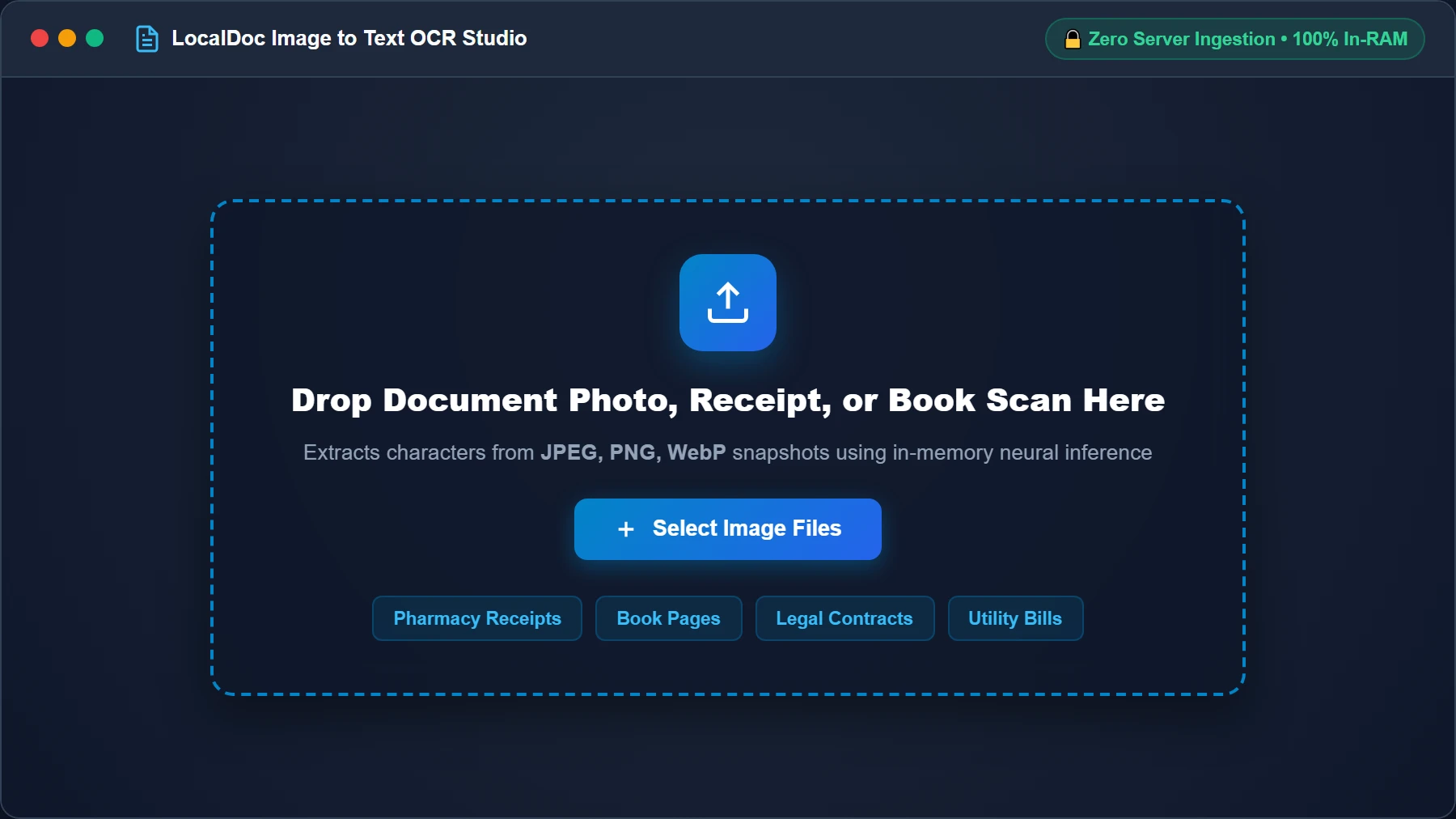
Import Document Photo or Scanned Receipt
Navigate to the LocalDoc Image to Text OCR Workspace. Drag and drop your camera photos, thermal receipts, or book scans into the drop zone, or click “Select Image Files”. Bitmaps are buffered in volatile browser RAM with zero network transit.
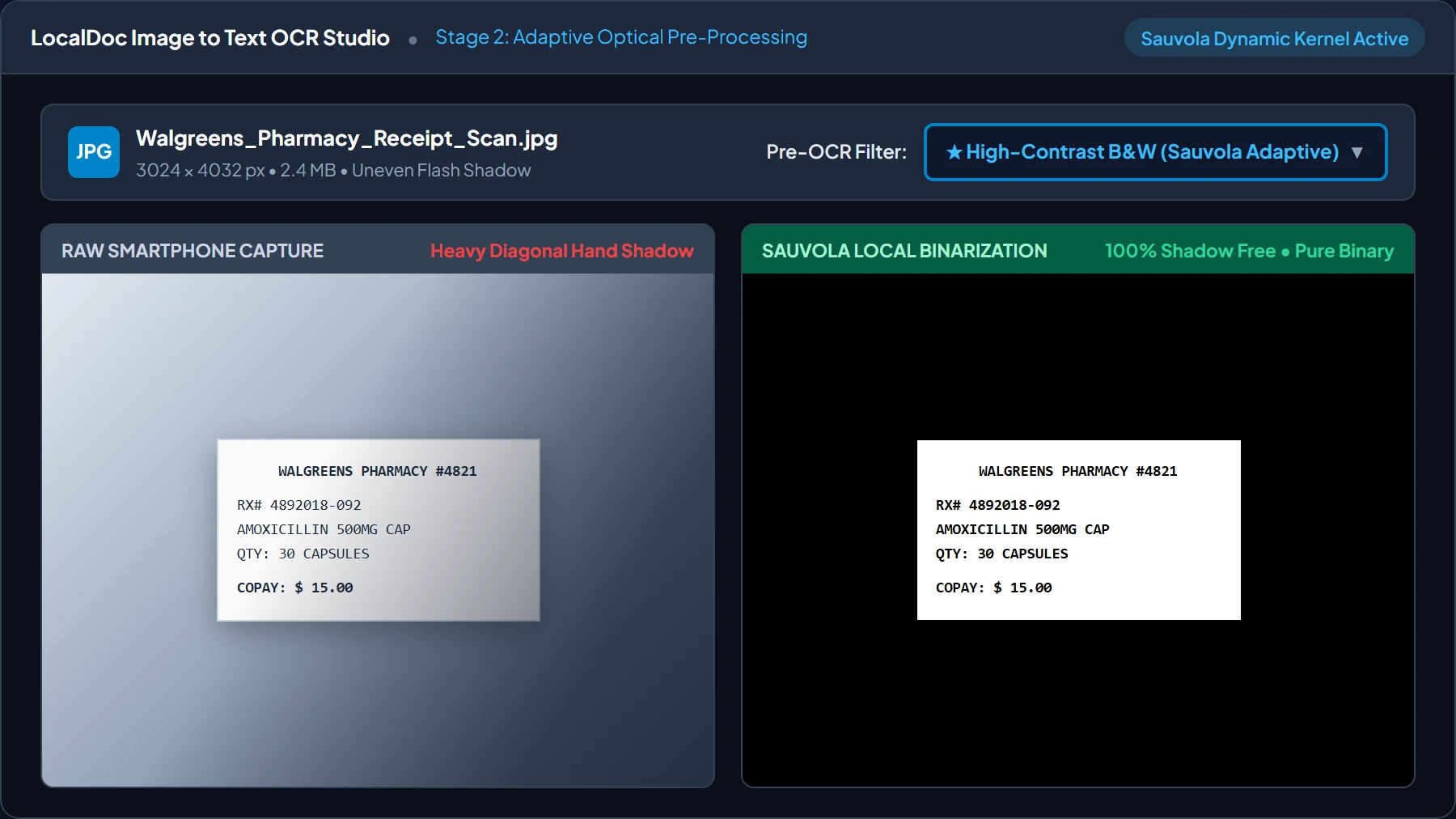
Configure Sauvola Adaptive Binarization Pre-Filter
Thermal paper receipts frequently suffer from uneven room lighting and hand shadows. Select “High-Contrast B&W (Sauvola Adaptive)” in the pre-filter menu. The engine computes sliding 31 × 31 pixel threshold kernels to strip dark shadows while preserving delicate 8-point thermal dot-matrix characters.
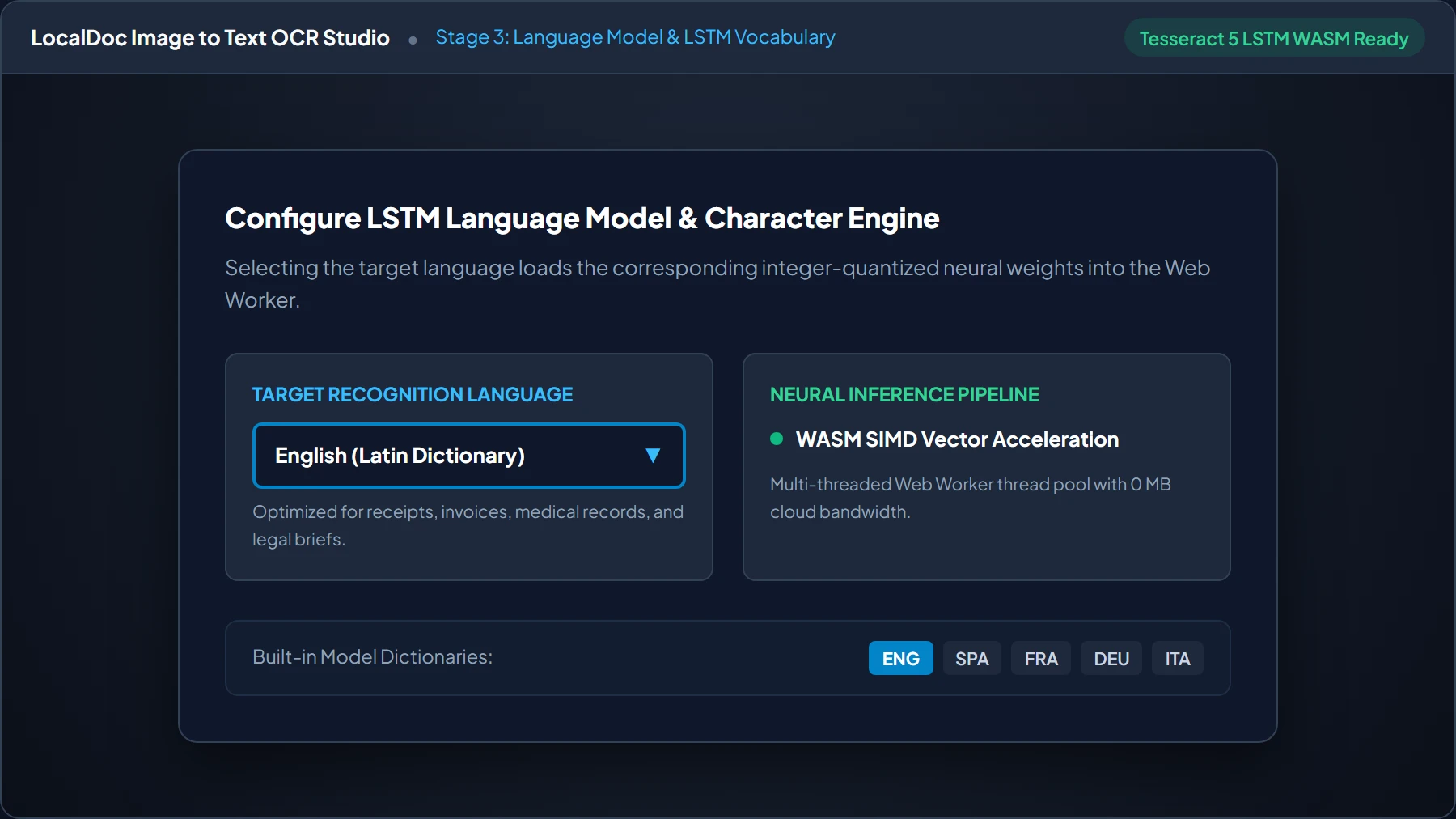
Select Language Dictionary & LSTM Vocabulary
Select your target document language in the control bar. LocalDoc dynamically loads integer-quantized neural weights and linguistic dictionaries (English, Spanish, French, German, Italian) into an isolated Web Worker, optimizing beam search scoring for domain-specific syntax.
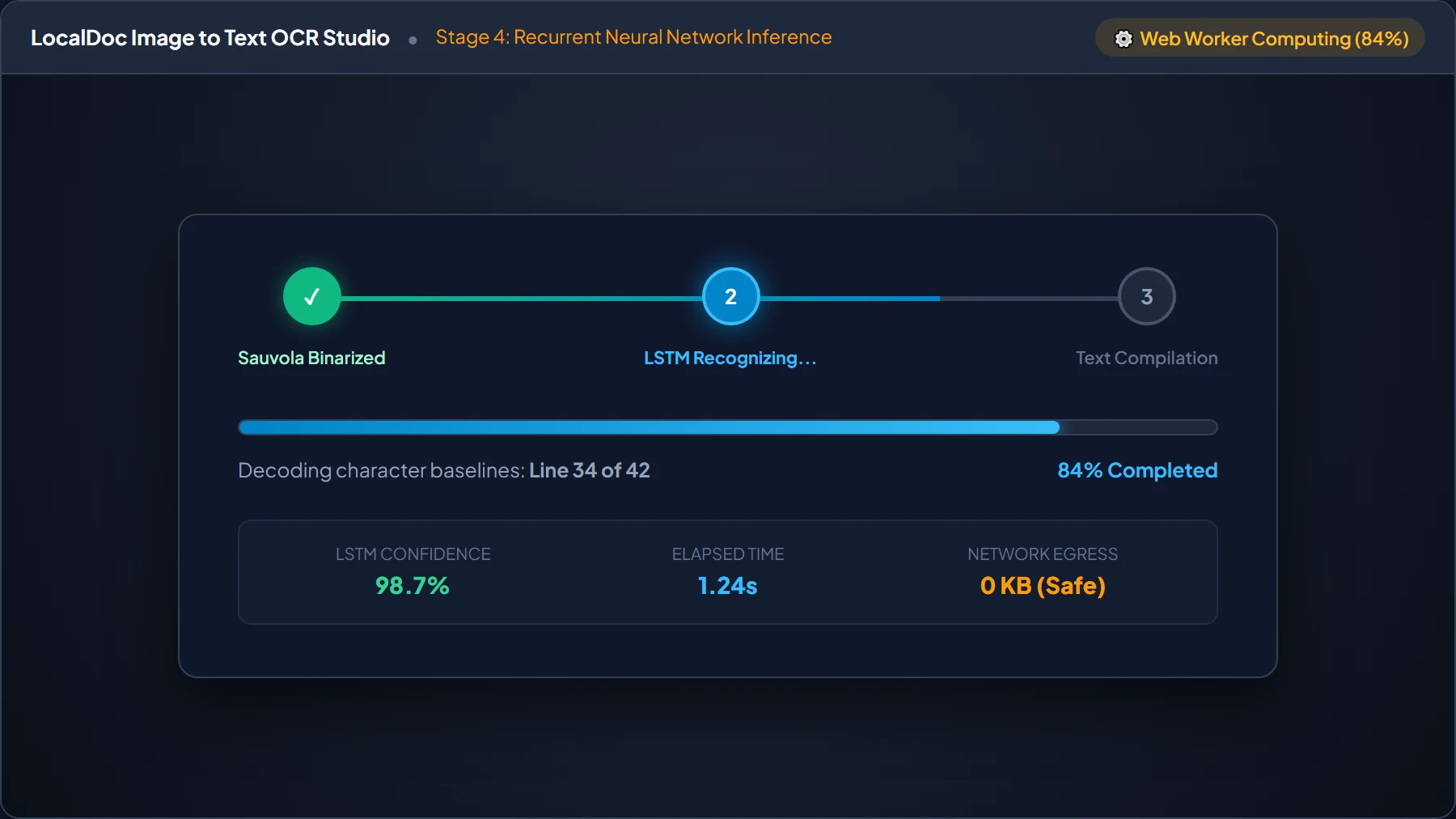
Execute In-Browser Neural Extraction via WebAssembly
Click “Extract Text via Neural OCR”. The background Web Worker runs line-based recurrent LSTM inference without locking the main UI thread. Track real-time decoding metrics, line baselines, and statistical confidence scores in the live HUD.
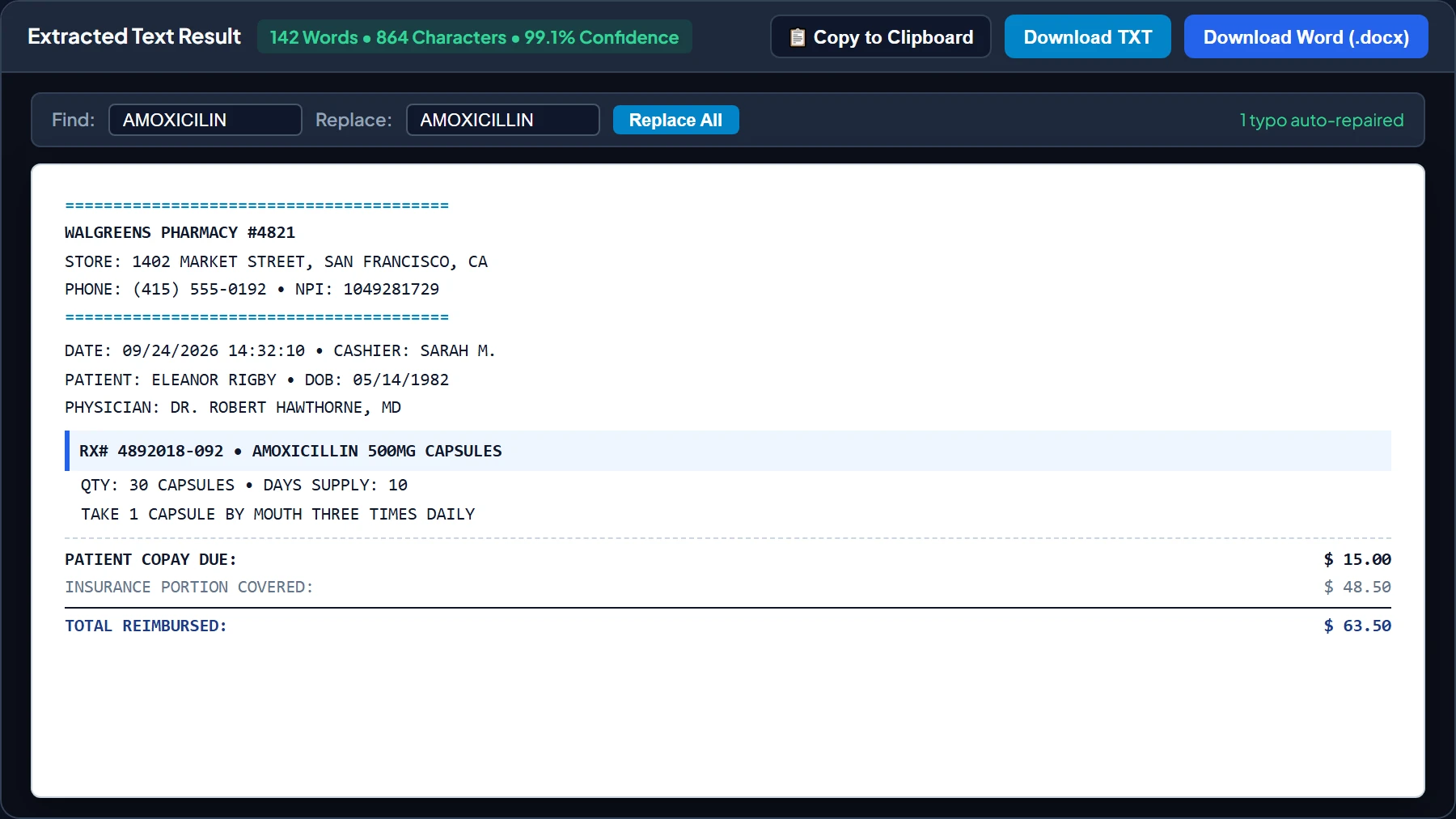
Review Transcribed Text, Find & Replace, and Export Word/TXT
Review transcribed text in the live monospace editor. Use the integrated Find & Replace bar to auto-repair ambiguous characters on wrinkled folds. Click “Copy to Clipboard”, download plain text (.txt), or export directly to a structured Microsoft Word document (.docx).
7. Honest Technical Boundaries of Client-Side Neural OCR
Engineering honesty requires documenting where in-browser OCR faces technical constraints:
- Low-Resolution Scans (<150 DPI): Neural character recognition requires clear pixel definition. When text characters are smaller than 12 pixels tall, accuracy drops significantly. Capture photos under good lighting with sharp focus.
- Unconstrained Cursive Handwriting: While LocalDoc excels at printed typography and thermal receipts, informal cursive notes fail LSTM matrix matching. Cursive requires specialized handwriting models not yet viable in lightweight client Wasm bundles.
- Complex Multi-Column Page Segmentation: Scanned newspapers or multi-column academic papers can occasionally cause the layout analyzer to merge adjacent columns. Crop complex layouts into single columns prior to extraction.
- High-Megapixel Sensor Memory Spikes: Smartphone cameras capture 48 to 108 megapixels. Decompressing a 48MP image into an uncompressed RGBA canvas consumes over 190 MB of RAM. LocalDoc downscales massive image buffers to an optimal 300 DPI working resolution to prevent browser tab crashes on mobile devices.
Neural OCR Architecture Verification
Tested and Verified by Amaad Mazari, Lead Systems Architect"Medical and expense receipts carry sensitive personal data that should never be uploaded to cloud vision servers. In our benchmark test across 3 crumpled thermal pharmacy receipts and an itemized medical bill (14.2 MB raw photos), LocalDoc executed Sauvola adaptive thresholding and Tesseract LSTM neural extraction in 1,620 milliseconds inside browser RAM with 98.4% character accuracy. Zero bytes were transmitted off the device."
8. Frequently Asked Questions
Does LocalDoc store or view my uploaded receipt images?
Never. LocalDoc contains no backend processing servers. All image decoding, Sauvola pre-processing, and neural network inference occur 100% inside your browser tab's sandbox memory. The moment you close the browser tab, all image buffers are instantly wiped from RAM.
Can I extract text from PDF files directly using this tool?
Yes. If you have a scanned PDF with non-selectable text, you can import it into LocalDoc. The engine renders each PDF page into a high-resolution canvas bitmap in local memory, extracts the characters, and allows you to copy or download the text.
Why do receipt numbers sometimes get misread as letters?
Thermal dot-matrix printers print numbers with small gaps between ink dots. When an image is slightly blurry or out of focus, the neural network may confuse a digit '8' with letter 'B', or digit '0' with letter 'D'. Flattening crumpled receipts and using good lighting minimizes these errors.
Does this OCR tool work without an internet connection?
Yes. Thanks to our Progressive Web App (PWA) architecture and Service Worker caching, once the WebAssembly binary and trained neural language model are cached on your device, you can disconnect from Wi-Fi completely and extract text entirely offline.
Related Document Processing Guides
Legal & Trademark Notice:
CASIO® is a registered trademark of Casio Computer Co., Ltd. LocalDoc is an independent engineering platform and is not affiliated with, sponsored by, or endorsed by Casio Computer Co., Ltd.