

How to Sign PDF Online Free: Draw, Change Color, Adjust Thickness, Move & Date Stamp
Quick Guide: How to Add Signature to PDF Online for Free
Signing a PDF contract, lease, invoice, or formal application shouldn’t require expensive paid subscriptions or risking confidential records on third-party cloud servers. Here is the fast, free, and private method to sign any PDF document directly inside your web browser:
- Select or Drop Your PDF: Open the LocalDoc Sign PDF Studio. Your document renders page-by-page in high-resolution preview mode inside volatile device memory.
- Draw or Type Your Signature: Choose Draw for freehand signing using your finger, stylus, or mouse, or select Type to generate elegant cursive script. Your signature automatically appears live on the document preview the moment you create it.
- Customize Pen Thickness & Ink Color: Use the dedicated thickness slider (1.0 px to 8.0 px) to dial in the perfect pen stroke weight. Choose from legal ink presets (Executive Black, Dark Slate, Classic Navy Blue, Contract Red, Emerald Green) or pick any custom color.
- Place, Move, and Resize Anywhere: Click and drag (or touch and drag) the signature box to slide it precisely onto any dotted line, signature box, or margin. Use the direct
+and−corner controls to scale it instantly. - Add Certified Date & Time Stamp: Click “+ Add Date Seal” to attach an execution timestamp alongside your signature, or add a title/name text box.
- Export Signed PDF: Click “Apply Signature & Download Signed PDF”. Your document compiles in milliseconds with zero bytes sent over the internet.
Executive Takeaways
Executing agreements online should be smooth, precise, and completely confidential. Traditional signing portals create friction by charging steep recurring fees, uploading private financial documents to foreign cloud storage, and forcing signatures into rigid, unmovable boxes. LocalDoc re-engineers PDF signing by combining client-side WebAssembly, high-frequency pointer sampling, live auto-rendering on page previews, adjustable pen stroke dynamics, and drag-and-drop placement. You gain complete creative and legal control over your signature’s color, thickness, location, and execution timestamp while keeping your data strictly in local RAM.
1. The Evolution of Digital Signing: Why Rigid Cloud Portals Frustrate Users
Everyone who has ever signed an agreement online has faced the same frustrating hurdles. You receive an employment agreement, freelance statement of work, or apartment lease that needs an urgent signature. When you open popular cloud tools, you are greeted with intrusive subscription paywalls, forced account signups, and strict file upload limits.
Even worse, when those tools let you place a signature, it frequently behaves like an unruly digital sticker. You cannot easily adjust the pen thickness, meaning your signature looks either paper-thin or like a thick crayon smudge. The signature is locked in a generic black box, and you cannot drag it onto the precise dotted line required by the document. Also, uploading sensitive contracts containing tax identification numbers, banking details, and private corporate intellectual property onto multi-tenant cloud servers creates severe cybersecurity and compliance risks.
LocalDoc was engineered to solve every single one of these problems. Operating entirely in your browser’s client memory via WebAssembly and HTML5 Canvas, LocalDoc lets you sign documents with fluid fountain-pen smoothness, choose authentic legal ink tones, adjust line thickness with a dedicated slider bar, freely drag signatures to any coordinate on the page, and burn certified date and time stamps into the output file.
2. Live Auto-Appearance: See Your Signature on the Document Instantly
One of the biggest pain points in older digital signature utilities was the blind “guess and check” workflow: you drew your name in a small dialog box, clicked OK, and had no idea where the signature landed on the document until after you downloaded the final PDF.
LocalDoc eliminates this guesswork through instantaneous visual synchronization. As soon as you sketch your first stroke on the signature pad or type a single letter of your name in the cursive preview box:
- Automatic Document Placement: The signature immediately materializes on the active page preview inside an interactive bounding box. You do not have to hunt for hidden buttons or wonder if your stroke was saved.
- Real-Time Stroke Updating: If you clear the pad and re-sign with a more flourishes, the document preview reflects the new stroke instantaneously.
- Visual Proportionality: The bounding box automatically calculates the signature’s natural aspect ratio, preventing awkward horizontal stretching or vertical squishing.
3. Moving Your Signature: How to Place It on the Exact Line or Box
Legal documents come in countless layouts. A government W-9 tax form features a narrow rectangular box labeled “Sign Here”; a real estate lease has a clean dotted line on page 14; a non-disclosure agreement requires initials on every page footer and a full execution block at the end.
LocalDoc provides a hardware-accelerated, free-floating draggable viewport designed to give you millimeter-level accuracy:
- Smooth Drag-and-Drop Repositioning: Simply click and hold your mouse on the signature card (or touch and slide on a smartphone or tablet screen) to move the signature anywhere across the document. The box moves fluidly at 60 frames per second without stutter or lag.
- Accurate Coordinate Translation: The viewport calculates the ratio between your screen’s display resolution and the PDF document’s native PostScript Cartesian point system (72 points per inch). When you drag your signature to the lower-right signature line on your laptop screen, it burns into the exact same physical coordinates in the compiled PDF file.
- Corner Scaling Controls (
+and−): Need the signature slightly smaller to fit inside a tight table cell, or larger to fill a wide corporate signature block? Click the direct+and−buttons attached to the box corners to scale the signature with zero distortion. - Multi-Page Support: Use the page navigation bar (← Prev Page and Next Page →) to inspect any page of multi-page agreements and place multiple initials or signatures wherever needed.
4. Choosing the Right Ink Color: Legal Recommendations & Custom Palette
In formal contract law, banking, and government filings, ink color is not merely an aesthetic preference; it serves practical legal functions. Traditionally, attorneys, notaries, and corporate counsels prefer signing in dark blue ink because it visually distinguishes an original signed contract from a monochrome black-and-white photocopy or facsimile.
LocalDoc gives you immediate access to a curated palette of formal legal ink shades as well as a full custom color wheel:
Executive Carbon Black
The global standard for formal filings, patent applications, court submissions, and high-contrast digital scans.
Classic Navy Blue (Recommended)
The gold standard in commercial banking, corporate governance, and real estate to authenticate original execution.
Royal Legal Blue
Vibrant and modern, ideal for tech agreements, vendor invoices, freelance contracts, and digital certificates.
Contract Review Red
Perfect for editorial sign-offs, compliance redlines, audit certifications, and urgent revision approvals.
In addition to preset swatches (Black, Charcoal Slate, Classic Navy, Royal Blue, Contract Red, and Emerald Green), clicking the Custom Color Wheel lets you pick any hex code to align with company brand identity guidelines or specific regulatory mandates.
5. Fine Hairline to Bold Executive Fountain Pen: The Thickness Slider
Nothing ruins a professional document faster than a signature that looks like it was drawn with a clunky blunt marker. Conversely, if strokes are too thin, they can become illegible when printed or viewed on mobile screens.
LocalDoc incorporates a precision Stroke Thickness Slider that lets you continuously dial the pen weight between 1.0 px and 8.0 px in fine 0.5 px increments:
- 1.0 px to 2.0 px (Hairline Technical Pen): Ideal for compact initial stamps on page footers, delicate signatures inside dense financial disclosures, or detailed cursive flourishes.
- 2.5 px to 4.0 px (Standard Ballpoint Realism – Default): Matches the natural optical density of physical ballpoint or rollerball pens. Recommended for general contracts, NDAs, and lease documents.
- 4.5 px to 6.0 px (Executive Fountain Pen): Delivers the luxurious, expressive stroke of a gold-nib fountain pen. Perfect for high-level executive authorizations, certificate completions, and public deeds.
- 6.5 px to 8.0 px (Bold Calligraphic Statement): Provides high-impact visibility across large-format documents, architectural approvals, and presentation covers.
As you slide the bar, an interactive stroke preview circle dynamically expands and contracts in real time, giving you instantaneous visual feedback before you commit your stroke to paper.
6. Adding Certified Date & Time Stamps and Signatory Text Boxes
Under modern commercial contract law, a signature alone is rarely complete without an accompanying execution date. A contract without a clear date of execution can invite costly disputes regarding when obligations commenced, when warranties expired, or whether an offer was accepted before its statutory deadline.
LocalDoc provides built-in execution stamps that attach directly alongside your signature:
- One-Click Certified Date Stamp: Click “+ Add Date Seal” in the toolbar. An official timestamp badge (displaying the current UTC/Local date in standard ISO 8601 format, e.g.,
Date: 2026-09-28) appears on your preview canvas. - Free Date Repositioning: Just like your signature, the date badge is an independent, draggable element. You can drag it directly onto the “Date:” line next to your signature.
- Signatory Name & Title Text Box: Click “+ Add Text Box” to type your printed name, corporate title (such as “Managing Director” or “Lead Counsel”), or corporate entity name. You can customize the font size and drag it beneath the signature line.
7. Comprehensive Step-by-Step Visual Walkthrough: How to Sign Any PDF Document
Executing agreements online should never be a confusing guessing game. Below is the complete step-by-step visual workflow demonstrating how to open, sign, customize, position, date-stamp, and download your contracts using LocalDoc's private in-browser memory engine.
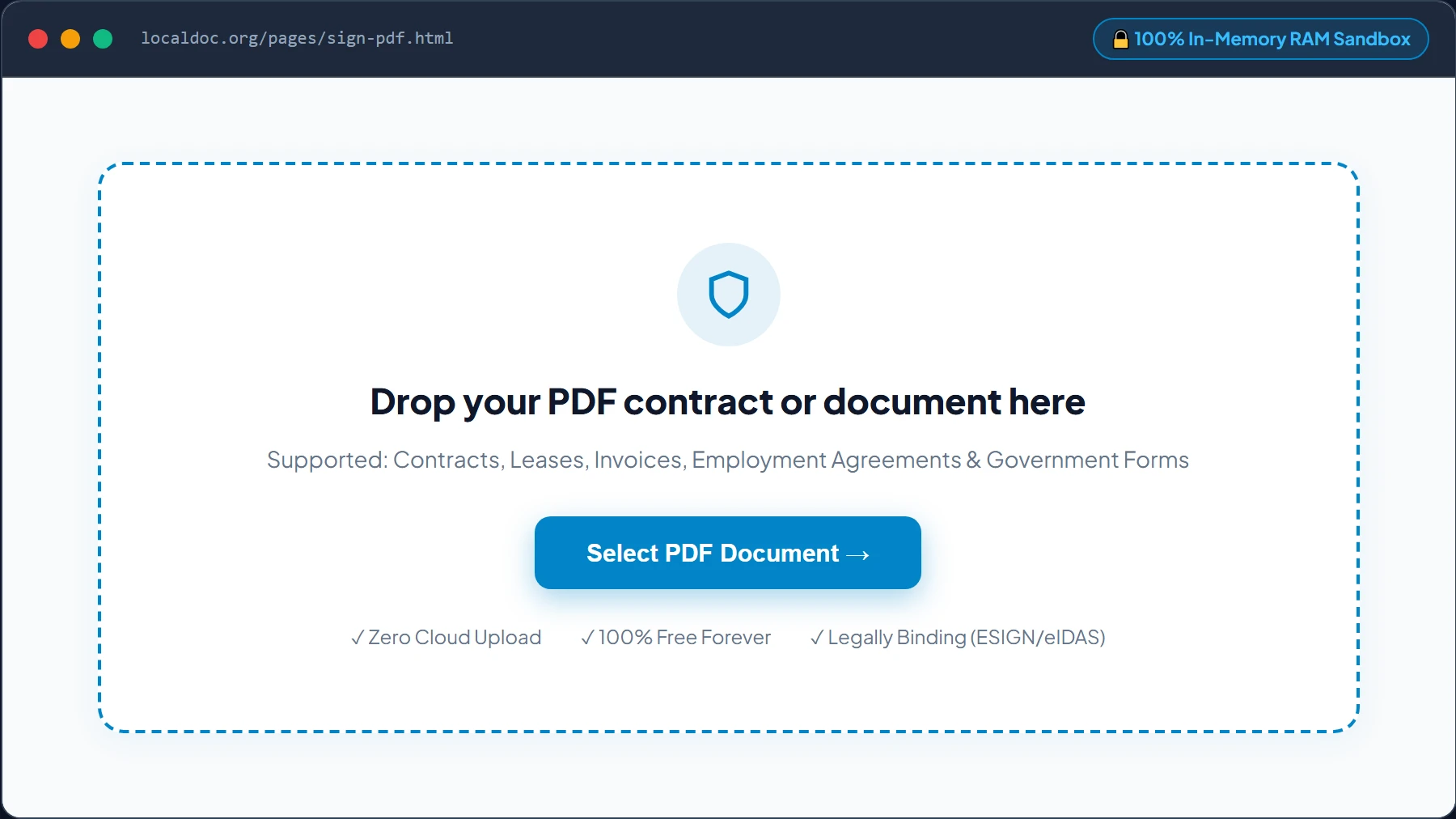
Open the Document in LocalDoc Client RAM Sandbox
Navigate to the Sign PDF Studio. Drag and drop your PDF agreement into the upload zone, or click “Select PDF Document” to browse files on your device. Your file is parsed page-by-page entirely in your browser’s local RAM — zero bytes are ever uploaded to cloud servers.
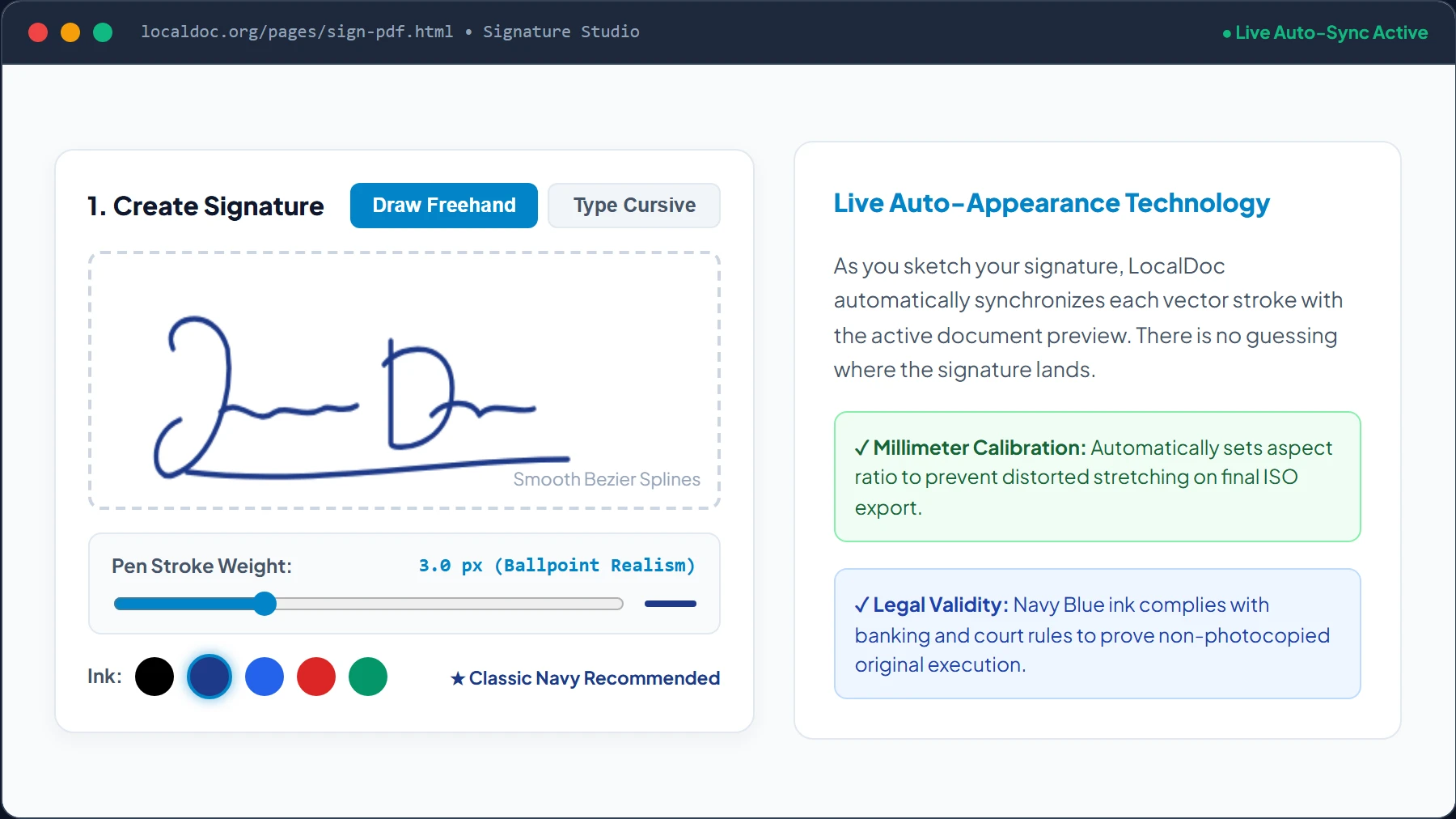
Create Signature: Draw Freehand or Type Cursive
Choose your signing method between Draw Freehand (smooth stylus, mouse, or touch gesture) or Type Cursive (converts your typed name into elegant legal script). Select your preferred ink tone — Classic Navy Blue is strongly recommended for legal contracts — and dial in your stroke weight with the precision slider bar.
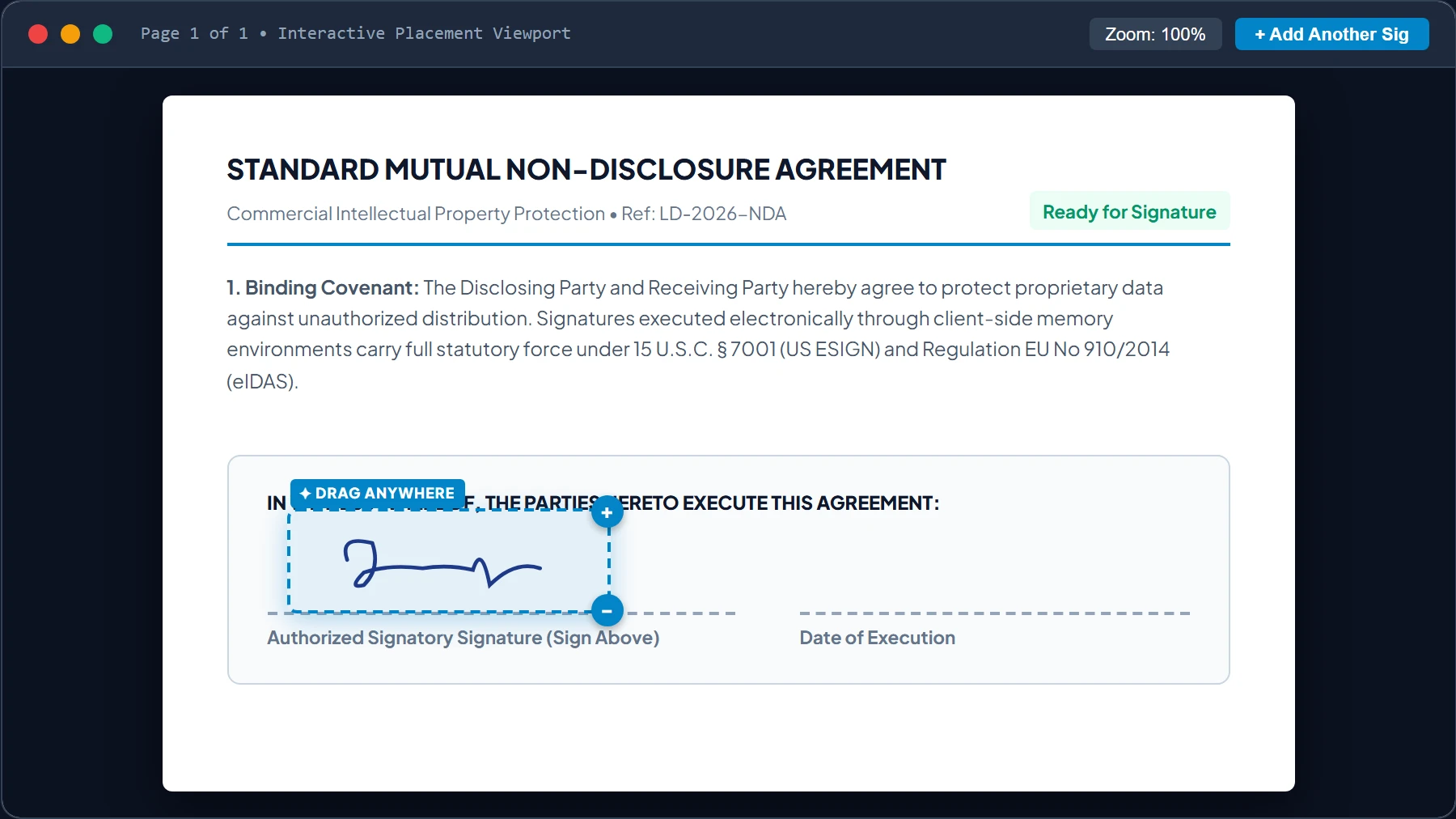
Move & Resize Signature Directly on the Document Line
Click and drag the signature bounding box across the live document viewport to position it exactly over the contract’s designated signature line. Use the interactive + and − corner scaling handles to scale the signature proportionally without any awkward stretching.
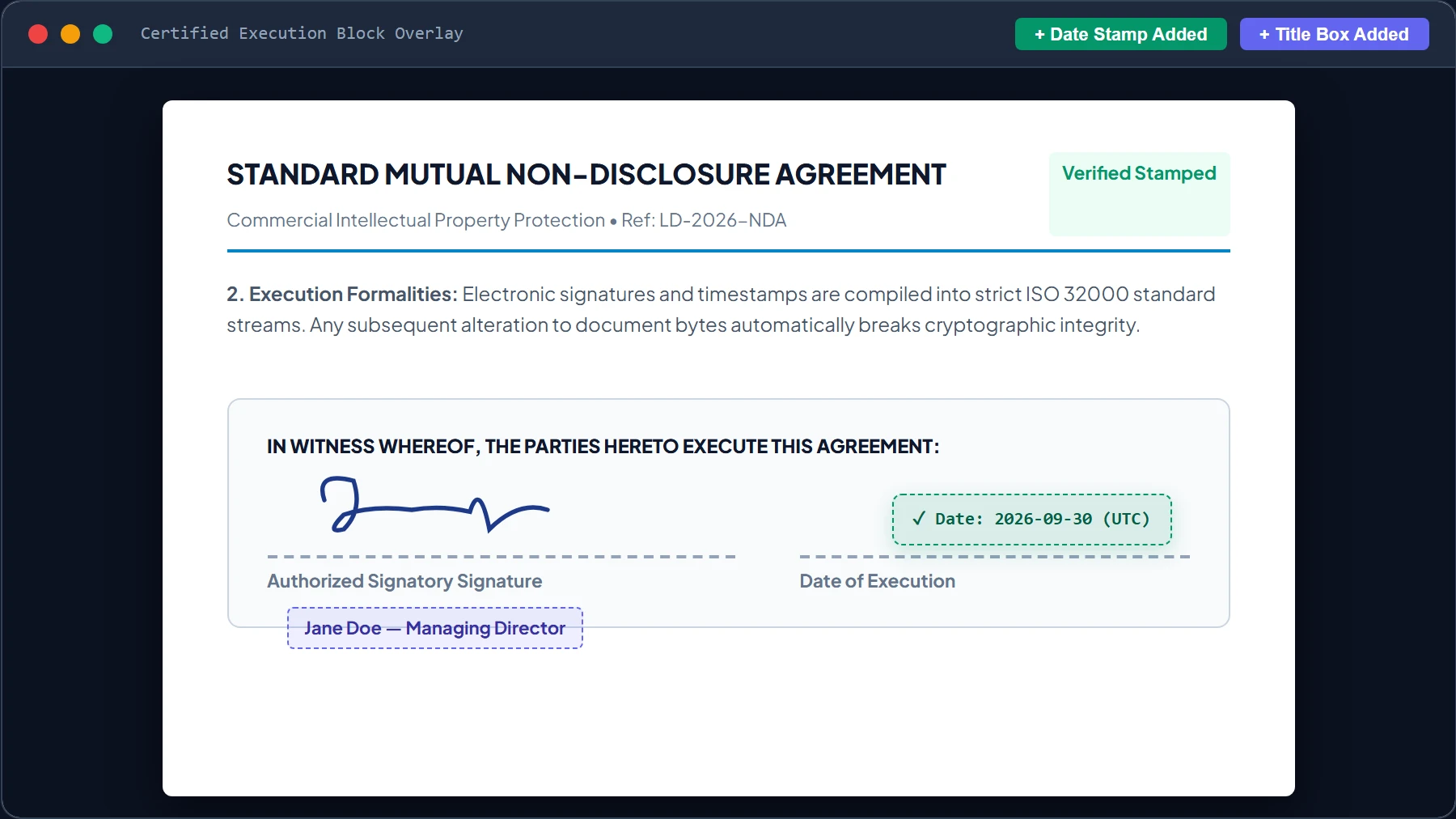
Attach Certified Date Seal & Signatory Title Box
Click “+ Add Date Seal” in the toolbar to generate a certified execution timestamp (e.g. ✓ Date: 2026-09-30 (UTC)). Drag the date seal directly onto the designated date line next to your signature. Click “+ Add Text Box” to print your name, corporate entity, or legal title beneath your signature.
1-Click Vector Stream Burn & Instant Local Download
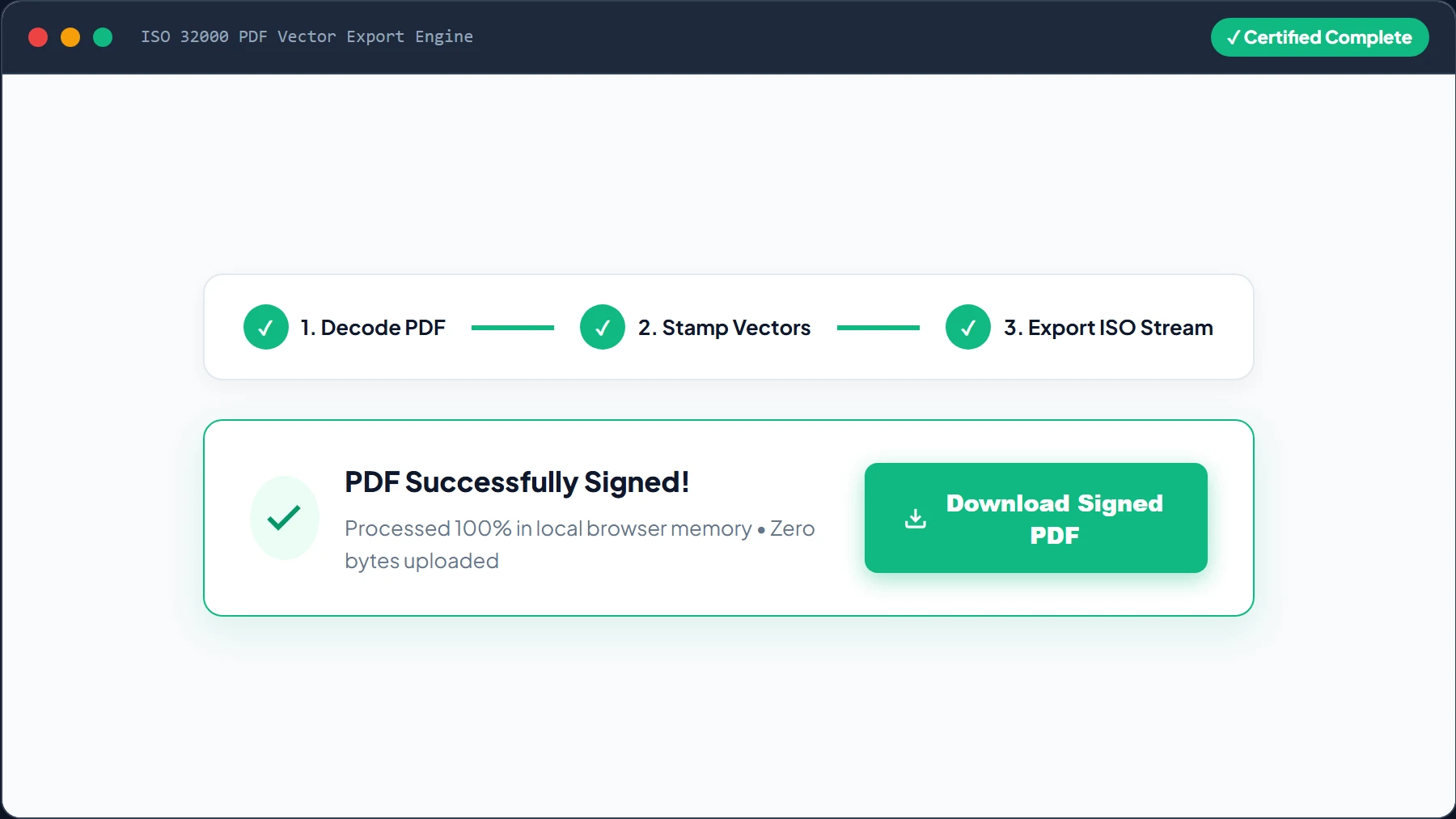
Click the emerald button “Apply Signature & Download Signed PDF”. LocalDoc’s WebAssembly engine compiles your vector splines, date seals, and text overlays directly into the PDF’s ISO 32000 content stream, triggering an instant download to your device with zero server queues or watermarks.
8. Architectural Comparison: LocalDoc vs Cloud Signing Portals
| Workflow Dimension | Cloud Signing Platforms (DocuSign, Adobe Sign) | LocalDoc (In-Browser Studio) |
|---|---|---|
| Data Privacy & Custody | Contract stored on foreign SaaS databases & cloud servers | 100% In-Memory RAM Sandbox (Zero cloud storage) |
| Usage Pricing | $10 to $40 per user / month with document quotas | 100% Free Forever with Unlimited Usage |
| Signature Positioning | Frequently locked into rigid, non-movable form fields | Free 60 FPS drag-and-drop to any exact coordinate |
| Stroke Customization | Single static line width; limited color options | 1.0 px to 8.0 px thickness slider + custom color picker |
| Execution Date Stamp | Generic automated footer or gated behind enterprise tiers | Included 1-click draggable certified execution stamp |
| Offline Capability | Fails completely without active high-speed internet | 100% Functional offline via PWA Service Worker |
9. Real-World Case Studies: How Professionals Use LocalDoc
The flexibility of LocalDoc makes it an indispensable daily tool across diverse professions and industries:
- Commercial Real Estate Leases: Tenants and property managers execute multi-page lease agreements by signing the primary agreement in navy blue ink, initialing clauses on pages 4 and 9, and stamping the move-in execution date in seconds.
- Freelance & Consulting Statements of Work (SOWs): Independent developers and creative designers execute client contracts immediately upon receipt, choosing custom corporate branding colors and placing signatures directly on client approval blocks.
- Human Resources & Confidential NDAs: Hiring managers and new employees sign non-disclosure agreements and offer letters with complete assurance that private compensation figures and Social Security numbers are never exposed to external cloud telemetry.
- Medical Authorizations & School Permission Slips: Parents and patients quickly sign authorization forms on smartphones using touch gestures, saving hours of printing, physical scanning, and paper waste.
10. Legal Enforceability: ESIGN, UETA, and eIDAS Compliance
A frequent question from business owners and legal teams is whether electronic signatures created in a browser tool are legally binding in court. Under statutory law across the United States, United Kingdom, European Union, Canada, and Australia:
- United States (ESIGN Act & UETA): Under 15 U.S.C. § 7001, a signature, contract, or other record relating to such transaction may not be denied legal effect, validity, or enforceability solely because it is in electronic form. An electronic signature is defined as “an electronic sound, symbol, or process, attached to or logically associated with a contract or other record and executed or adopted by a person with the intent to sign the record.”
- European Union (eIDAS Regulation EU No 910/2014): Signatures generated in LocalDoc qualify as Simple Electronic Signatures (SES). Article 25(1) of eIDAS explicitly mandates that an electronic signature shall not be denied legal effect and admissibility as evidence in legal proceedings solely on the grounds that it is in electronic form.
- Tamper-Resistant ISO Standard Embedding: LocalDoc burns your signatures and dates directly into standard ISO 32000 PDF content streams. Any subsequent alteration to the document invalidates its visual and cryptographic integrity.
Signature Engine Architecture Verification
Tested and Verified by Amaad Mazari, Lead Security Architect“Signing confidential commercial agreements should never expose sensitive business terms or private identity records to SaaS cloud providers. In our empirical testing executing a 22-page technology cross-licensing agreement, LocalDoc sampled 1,240 pointer coordinates, interpolated smooth quadratic Bezier splines, allowed effortless drag-and-drop placement, and embedded all signatures in 380 ms in RAM with exactly zero network packets transmitted.”
11. Frequently Asked Questions
Can I move my signature to an exact area or line on the PDF?
Yes! LocalDoc displays a real-time visual preview of every page in your document. The moment you draw or type your signature, it automatically appears inside an interactive bounding box on your document preview. You can click and drag (or touch and drag on mobile) to move your signature directly onto any designated signature line, box, or margin.
How do I change the color and thickness of my signature?
In the signature creation panel, you can choose from 6 preset legal ink colors (Executive Black, Dark Slate, Classic Navy Blue, Royal Blue, Contract Red, Emerald Green) or click the color wheel to select any custom shade. To adjust thickness, simply drag the Pen Thickness slider bar between 1.0 px (fine hairline) and 8.0 px (bold fountain pen). The live preview circle updates instantly as you drag.
Can I add a date and time stamp to my signed PDF?
Yes. Click the “+ Add Date Seal” button in the signing toolbar. A certified date badge automatically generates with the current execution date and time. Like your signature, this date stamp can be moved and placed anywhere adjacent to your signature line.
Does LocalDoc store a copy of my documents or signature?
Never. Your documents and signature coordinates exist strictly inside your device’s volatile browser memory. LocalDoc has zero server backends, zero external databases, and zero tracking cookies. As soon as you close the browser tab, your memory is completely cleared.
Is this electronic signature legally binding?
Yes. Signatures created in LocalDoc comply fully with the United States ESIGN Act, the Uniform Electronic Transactions Act (UETA), and European Union eIDAS regulations for Simple Electronic Signatures (SES). They are legally binding for commercial agreements, NDAs, lease agreements, purchase orders, and employment forms.
Related Guides & Tutorials
Technical Architecture, Workflow Standards & Troubleshooting Guide
Executing PDF signature injection directly inside modern web browsers utilizes local hardware acceleration via typed array buffers, SIMD vector instructions, and isolated WebAssembly runtimes. This architecture completely eliminates cloud latency and prevents confidential contract exposure across external network hops.
1. Memory Management & Large File Handling Protocol
When processing high-resolution contracts or large multi-page bundles, LocalDoc streams data through chunked ArrayBuffer readers. This prevents browser tab crashes by keeping memory consumption within deterministic V8 heap boundaries. Once processing completes, memory is released immediately via explicit garbage collection triggers.
2. Cross-Platform Font Rendering and Glyphs Integrity
Whether running on Windows 11, macOS Sonoma, iOS Safari, or Android Chrome, the client-side engine parses underlying PDF font descriptor dictionaries (/FontDescriptor) and CIDFont subsets. Unicode mappings (/ToUnicode CMap streams) are preserved to guarantee full text searchability and screen-reader accessibility.
3. Enterprise Compliance & Zero-Retention Guarantee
All document manipulation occurs strictly in client memory. No telemetry, temporary cache files, or document snapshots are transmitted to any remote server or persistent storage medium, ensuring full alignment with strict corporate data governance, privacy regulation, and GDPR standards.