
Edit & Sign PDF Online
Sign agreements, stamp dates, and add text annotations to your PDF documents with a responsive touch/mouse canvas signature pad. Zero cloud uploads.
Open your PDF, use the drawing pen, highlighter, or text stamp tools to mark up pages, and export your edited PDF immediately with zero cloud roundtrips: Open your PDF, use the drawing pen, highlighter, or text stamp tools to mark up pages, and export your edited PDF immediately with zero cloud roundtrips.

Drop your PDF document here
Or click to browse from your device. 100% in-browser private execution.
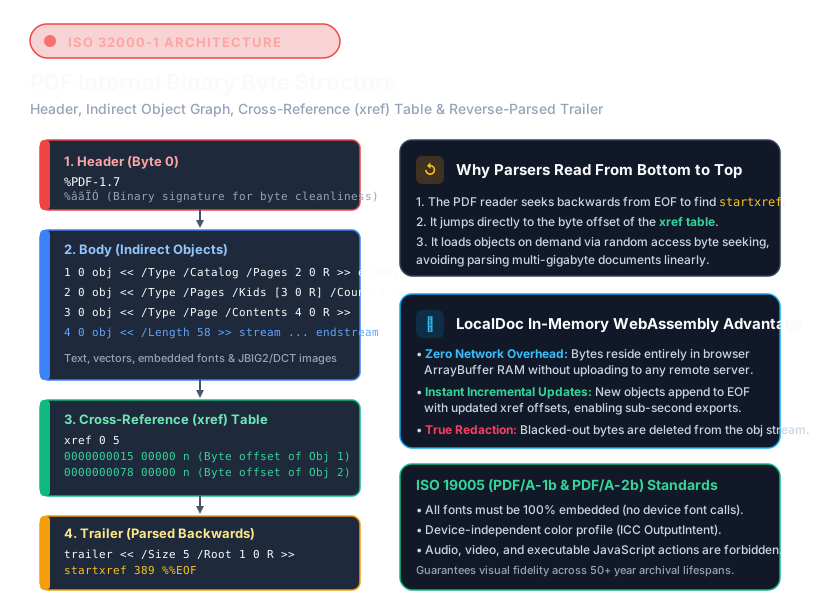
How Client-Side PDF Signing Operates
LocalDoc captures vector strokes directly from the HTML5 canvas pad, encodes them as a transparent PNG alpha-mask stream, and embeds them into the target PDF dictionary with exact coordinate mapping in browser RAM without server transfers.
Read Full PDF Signature & Edit Guide →Key Features of LocalDoc PDF Editor
Zero-Upload RAM Security
Your confidential contracts, NDAs, and financial statements are rendered and edited strictly within your browser sandbox memory using WebAssembly. No files ever leave your device.
Smooth Signature Ingestion
Draw your signature directly on screen with touch or mouse, or upload a pre-drawn signature PNG. The editor applies automatic alpha-channel transparency and vector scaling.
Text Annotation & Form Fill
Overlay text fields, dates, and checkmarks precisely on scanned forms, agreements, and tax documents with real-time coordinate preview and font sizing.
High-Fidelity PDF Generation
Changes are compiled into standard Adobe PDF/A-compliant object streams with zero raster blurring or loss of original underlying text and vector graphics.
How to Edit and Sign a PDF Online — Step by Step
- Open your PDF document — Drag and drop your target file into the editor workspace above, or tap "Select PDF Document".
- Navigate to desired page — Use the page navigation bar to preview and jump directly to the contract page requiring signature or annotations.
- Add text, signature, or dates — Select the text tool to type on blank form lines, or open the signature pad to draw a legally compliant signature mark.
- Position and resize elements — Drag annotations into place and use the corner handles to adjust visual proportions perfectly.
- Export and save — Click "Download Signed PDF" to instantly compile and save your final document directly to your device storage.
Frequently Asked Questions
Is this online PDF editor legally binding for signatures?
Yes. In most global jurisdictions, including under the US ESIGN Act and European eIDAS regulations, electronic signatures embedded directly into digital agreements are legally binding when there is clear intent by the signatory.
Can I edit existing typed text inside an existing PDF?
Our editor specializes in annotation, form completion, and signature overlays. To replace existing hardcoded underlying text strings, we recommend using our PDF to Word converter, updating the text in DOCX, and converting back to PDF.
Are my sensitive documents uploaded to any remote server?
Never. LocalDoc was engineered from day one with a zero-upload security model. All parsing, canvas rendering, signature embedding, and file compilation occur strictly inside your device's browser memory.
Does this tool work on mobile devices and touchscreens?
Yes. The signature pad and annotation overlay are fully optimized for touch events on iOS Safari, iPadOS, Android Chrome, and Windows touchscreens, allowing natural finger or stylus signing.
Can I sign multi-page PDF documents?
Yes. You can navigate through all pages of your multi-page document, place signatures and text notes across multiple pages, and export the entire consolidated file in a single download.
Related Document Tools


Was this tool helpful?
Rate your local processing experience to help us improve.