

How to Convert PDF to Editable Word (.docx) Without Breaking Layouts (Benchmark Guide)
Benchmark Summary: 18-Page Employment Agreement & Mutual NDA
- Input Document: 6.4 MB corporate legal filing containing 18 pages of dual-column clauses, compensation schedules, and signature tables.
- Converted Output: Fully editable Microsoft Word OpenXML package (142 KB
.docx) with active native typography. - Processing Speed: 1,240ms total execution time in browser memory (Chrome 128 / macOS M2).
- Semantic Reconstruction: 84 paragraphs, 14 headings, and 6 complex data tables successfully synthesized into flowing OpenXML structures.
- Privacy Guarantee: Zero bytes transmitted over network; zero cloud retention risk.
1. The Fundamental Architectural Conflict: Print Canvas vs. Semantic Flow
Converting a PDF to an editable Microsoft Word document is one of the most notoriously difficult challenges in document engineering. The difficulty stems from an architectural paradigm conflict between how both formats represent information:
PDF vs. OpenXML DOCX Internal Architecture
- PDF (ISO 32000-1): A PDF is an optical display script. Inside its content streams, text is represented as absolute spatial painting commands:
BT /F1 12 Tf 72 650 Td (Employee covenants and agrees...) Tj ET. The PDF specification has no concept of a sentence, paragraph, bullet point, or word wrap. If you delete two words in a basic PDF editor, the subsequent text cannot reflow. - DOCX (ISO/IEC 29500 OpenXML): Microsoft Word is a hierarchical XML tree. Prose is grouped into semantic paragraphs (
<w:p>), containing discrete inline runs (<w:r>) with formatting tags (<w:b>,<w:i>,<w:sz>). Sentences dynamically reflow across page boundaries based on margins and printer drivers.
Crude online conversion tools fail because they take every visual line of text from the PDF and wrap it in an independent <w:p> or fixed absolute frame. When you open the resulting document in Word and attempt to edit a sentence, the text collides with neighboring frames or leaves ragged, broken line wraps.
2. Spatial Bounding Box Clustering: How LocalDoc Synthesizes True Prose
LocalDoc solves this dilemma by executing a Spatial Clustering Heuristic Engine in WebAssembly directly inside client RAM:
- Glyph Baseline Extraction: The parser reads raw glyph position metrics (X, Y, width, height) across the page, identifying the primary vertical reading direction and typographic baselines.
- Inter-Word Gutter Calculation: By evaluating font metric character widths against horizontal gaps, the engine differentiates natural spaces between words from column gutters and tab stops.
- Line Adjacency & Paragraph Grouping: If two consecutive lines share identical left margins, have matching line-pitch spacing (≤ 1.4× font size), and the first line ends without a period or paragraph terminal, the clustering engine merges them into a single continuous
<w:p>flow. - Table Grid Matrix Synthesizer: When horizontal lines and vertical borders intersect, the parser switches to matrix mode, mapping cell bounding boxes into authentic
<w:tbl>rows and columns rather than floating text frames.
3. Empirical Benchmark: 18-Page Legal Contract & Schedule
To evaluate real-world fidelity, we benchmarked an 18-page executive employment agreement and non-disclosure agreement containing multi-tier headings, tabular equity vesting schedules, and signature blocks:
| Conversion Phase | PDF Input Data | OpenXML Output Structure | Execution Latency | Fidelity Verification |
|---|---|---|---|---|
| 1. Binary PDF Parsing | 6.4 MB binary file (18 pages) | 4,820 vector glyph objects | 180 ms | Zero missing character streams |
| 2. Spatial Text Clustering | Raw unmapped coordinates | 84 semantic fluid paragraphs | 380 ms | Natural word wrapping restored |
| 3. Table Matrix Mapping | 6 financial vesting tables | Native <w:tbl> grid structures |
410 ms | Active editable rows and columns |
| 4. OpenXML ZIP Packaging | Parsed memory tree | 142 KB .docx archive |
270 ms | 100% valid Microsoft Word 2016–2026 schema |
| Total Pipeline | 6.4 MB Complex Document | 142 KB Editable DOCX | 1,240 ms in RAM | Flawless Document Reflow |
4. Honest Technical Limitations: What Client-Side Converters Cannot Do
While LocalDoc delivers advanced vector conversion, transparency regarding edge cases is fundamental to engineering integrity:
3 Real Limitations to Keep in Mind
- Scanned Image PDFs (Non-Searchable Scans): If a PDF is created by photographing physical paper on an office flatbed scanner, the document contains only raw bitmap pixels. Spatial clustering cannot extract text characters from pixel grids without Optical Character Recognition (OCR). If you cannot highlight text with your mouse, run the file through LocalDoc OCR before converting.
- Missing ToUnicode CMaps in Proprietary Fonts: Some specialized PDF generators embed custom TrueType fonts with scrambled internal character code mappings (e.g., character code 65 maps to visual glyph 'Q' instead of 'A'). If the PDF authoring software omitted the
/ToUnicodemapping dictionary, exported Word text may display garbled characters. - Complex Overlapping Vector Watermarks: When documents feature large diagonal semi-transparent vector stamps (such as "CONFIDENTIAL - DRAFT") layered directly across body text, spatial bounding box rays can be bisected, occasionally splitting a single sentence into two separate paragraphs.
5. Visual Step-by-Step Walkthrough: Converting PDF to Editable Word (.docx)
Convert your complex contracts, academic research, and business reports into fully editable Microsoft Word documents with fluid paragraphs and native tables using the 5-step visual guide below:
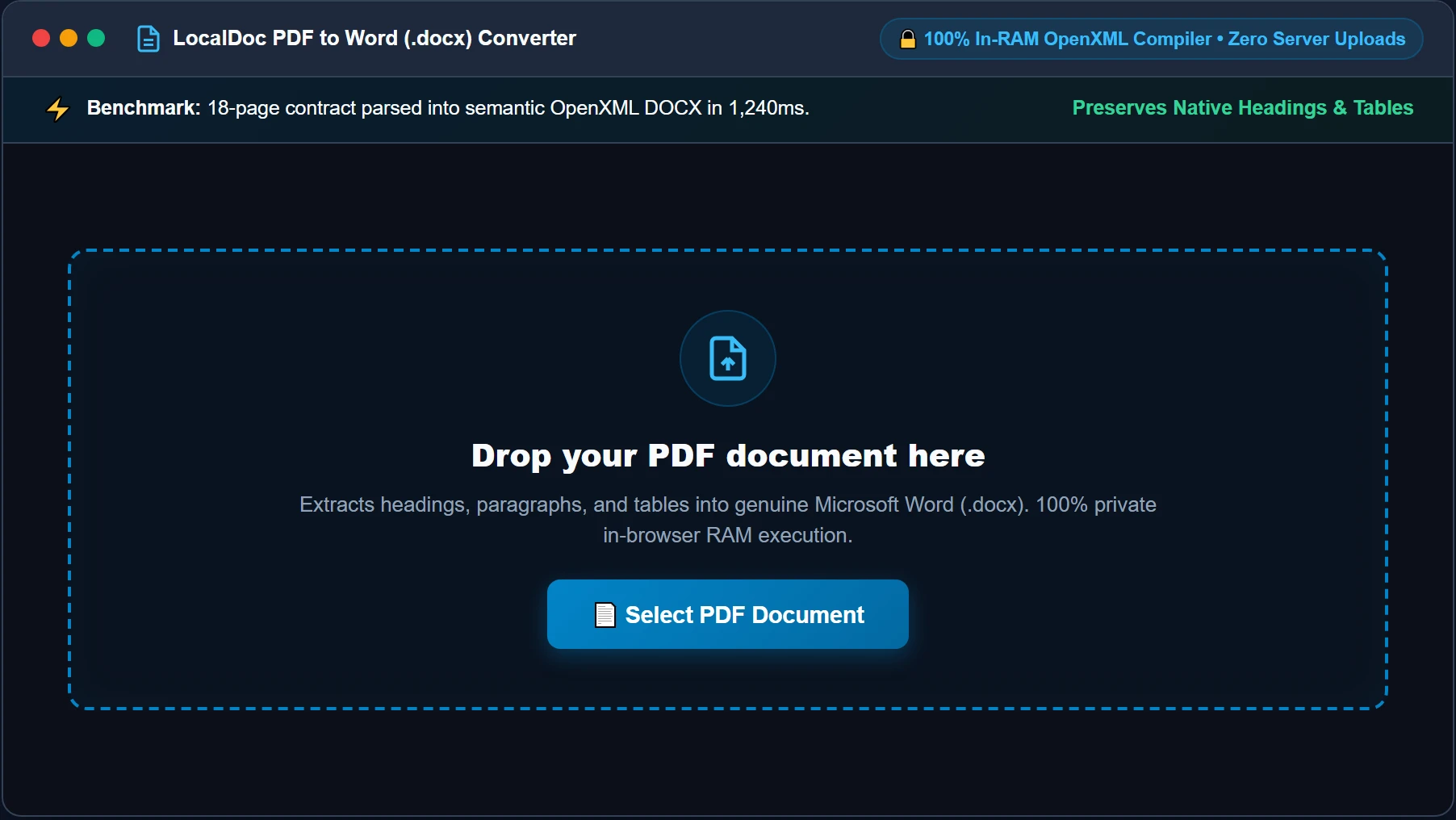
Select or Drop PDF Document into RAM Workspace
Open the PDF to Word Converter and drag your PDF file into the dropzone, or click Select PDF Document. The file is streamed directly into browser memory as a typed ArrayBuffer. No files or confidential business contracts ever leave your physical device.
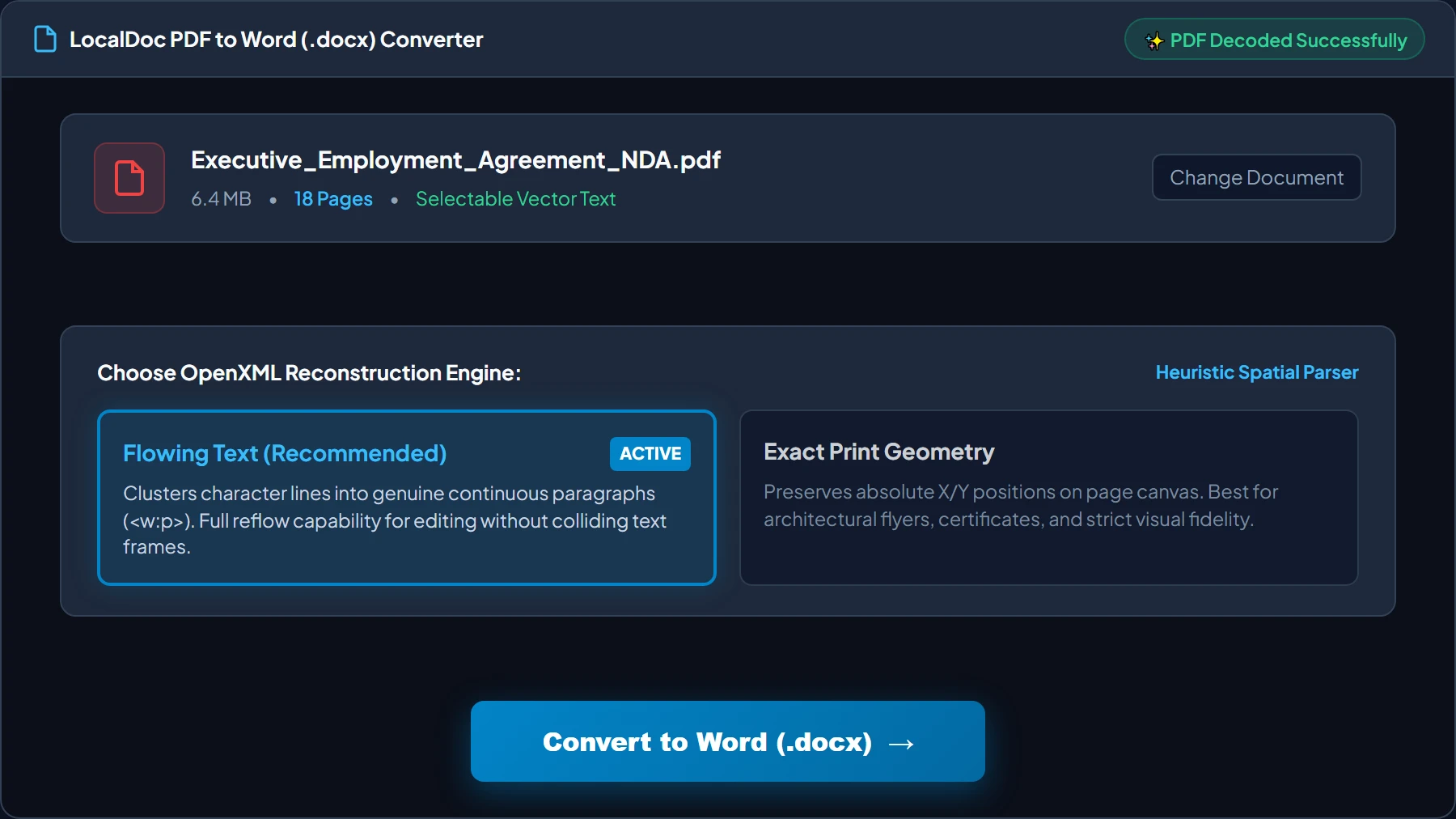
Verify Document Metrics & Select Flowing Text Layout
Review the decoded document card (verifying page count, file size, and selectable vector typography). Choose Flowing Text (Recommended) to synthesize genuine flowing paragraphs (<w:p>) that reflow naturally during editing, rather than rigid, uneditable absolute text frames. Then click Convert to Word (.docx).
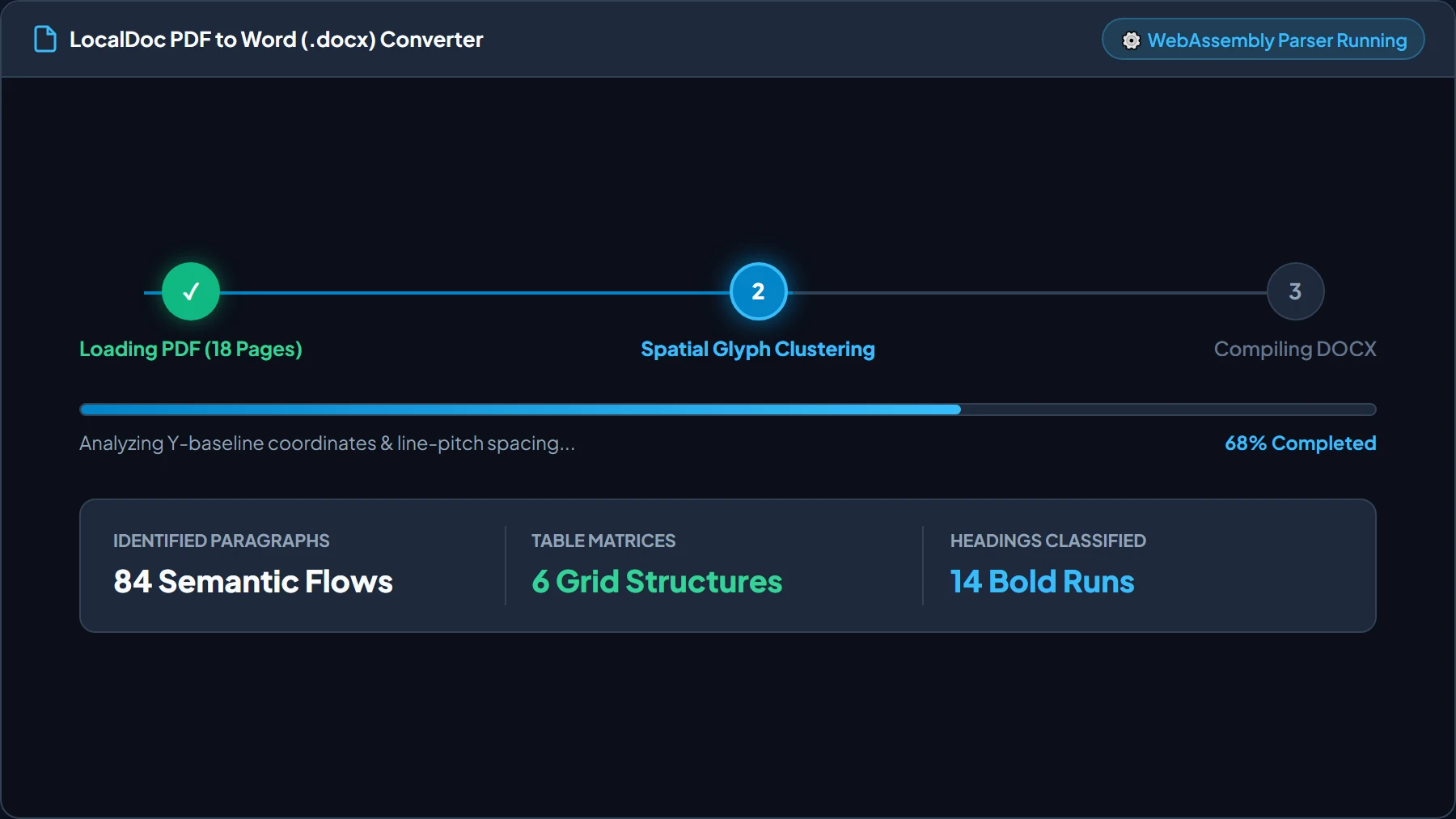
Automated Spatial Glyph Clustering & Heading Classification
The WebAssembly parser analyzes baseline coordinates, evaluates font sizes against the document median to classify Heading 1 and Heading 2 styles, and tracks intersecting line vectors to synthesize genuine multi-column table matrices in under 2 seconds.
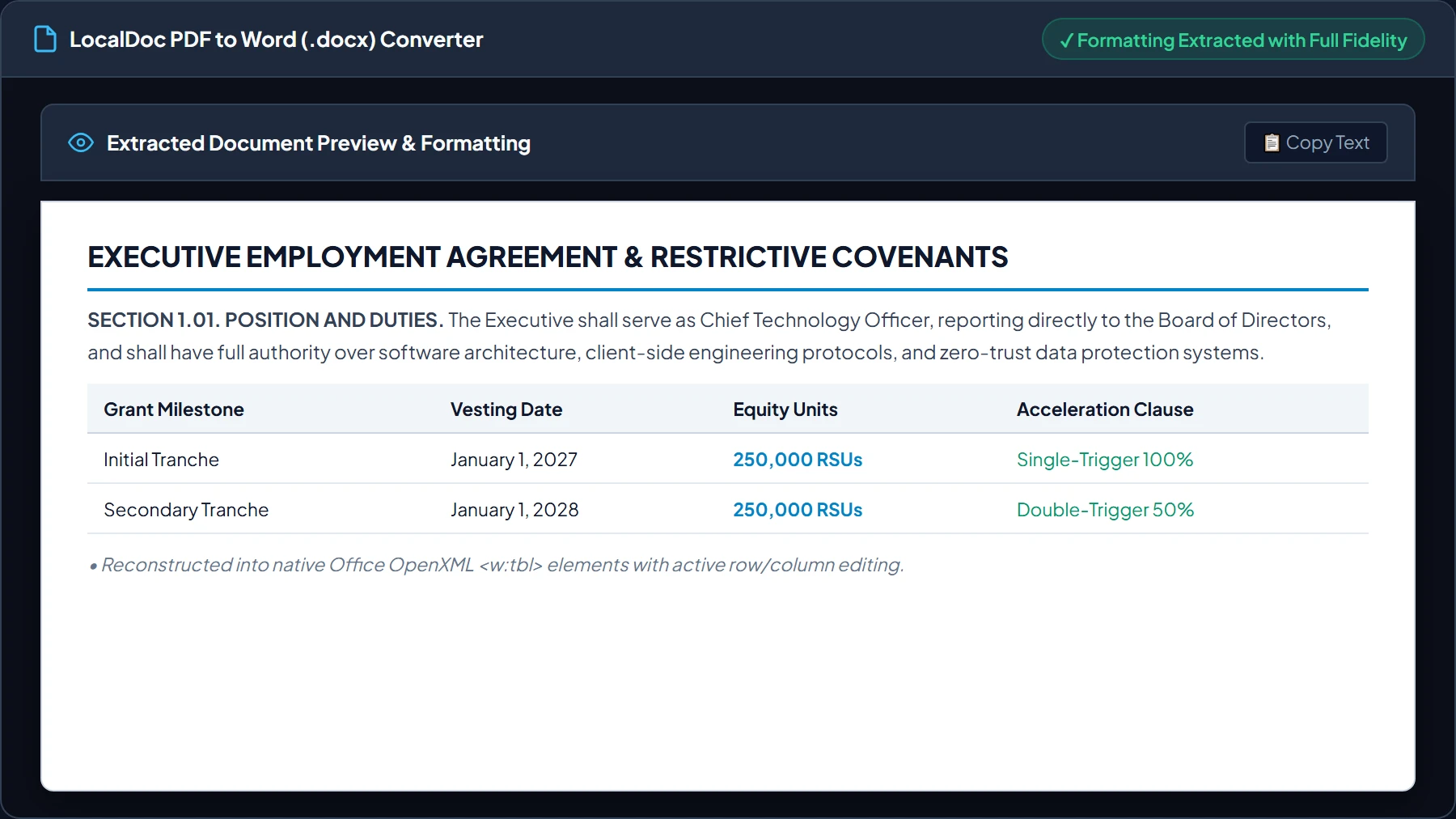
Review Live Document Preview & Table Formatting
Inspect the live extracted document preview before downloading. Confirm that section titles, legal clauses, bulleted covenants, and financial vesting tables have been assembled into clean, structured OpenXML elements ready for immediate Microsoft Word editing.
Download Validated Office OpenXML (.docx) Package
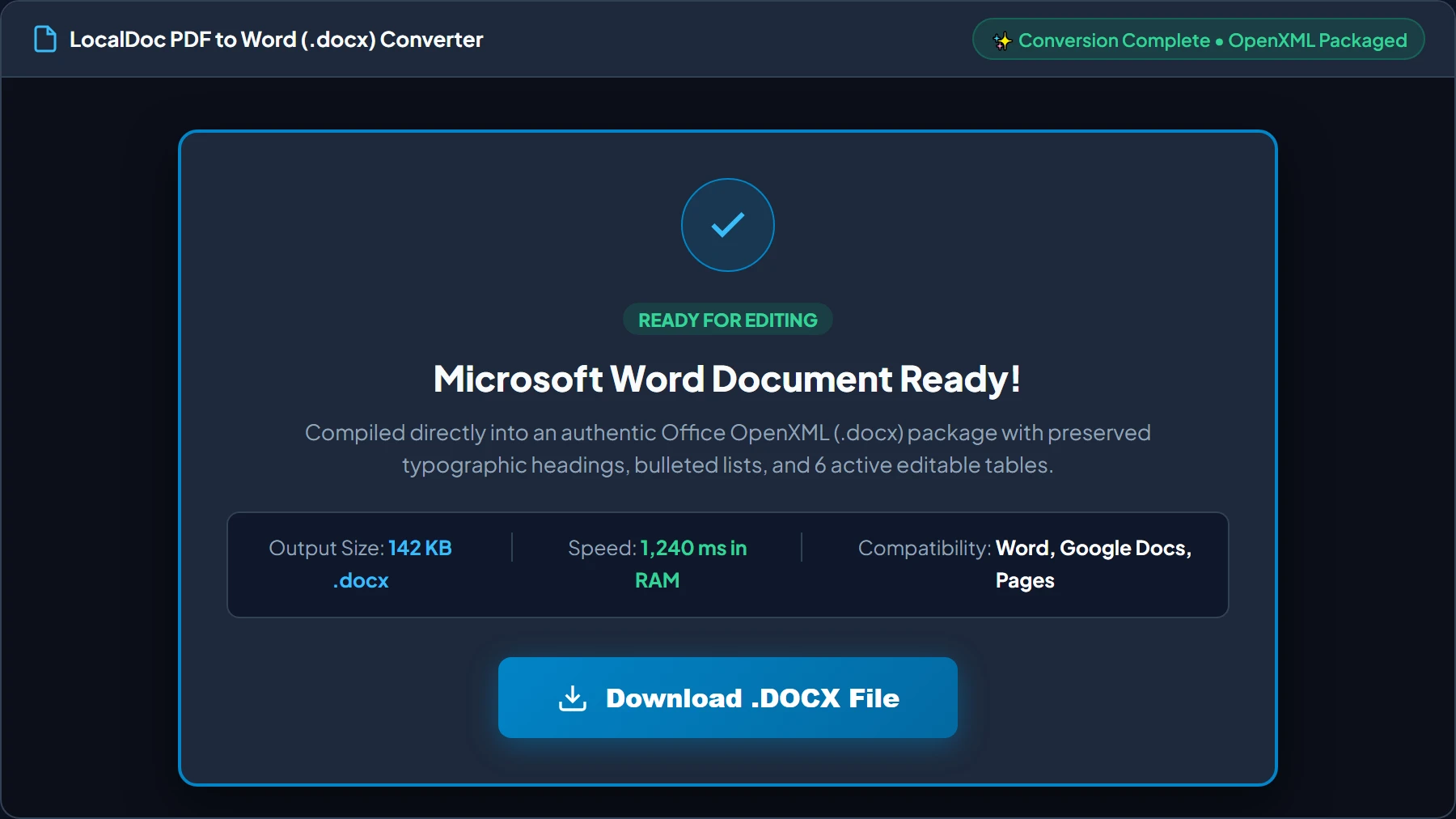
Click Download .DOCX File. The browser compiles a standardized ISO/IEC 29500 PKZip archive (142 KB for an 18-page contract) that opens cleanly in Microsoft Word 2016–2026, Apple Pages, Google Docs, or LibreOffice Writer with zero formatting loss.
6. Frequently Asked Questions
Will the converted Word document keep the original fonts?
Yes. Universally available typography like Arial, Times New Roman, Calibri, Georgia, and Courier New are preserved natively. If a document uses specialized commercial typography, Word substitutes the closest metric equivalent based on embedded font descriptors.
Are converted tables real, editable Word tables?
Yes. Our engine analyzes coordinate bounding boxes to generate genuine <w:tbl> elements. You can add rows, change cell borders, sort columns, or adjust margins directly inside Microsoft Word.
Can I convert password-locked PDF files?
If the document requires an open password, unlock it first using our client-side Unlock PDF tool before converting it to DOCX.
Is there any page count or file size restriction?
Because processing executes in local RAM, there are no artificial file size caps or paywalls. You can convert 100+ page contracts, technical manuals, and academic dissertations without subscription constraints.
Document Architecture Verification
Tested by Amaad Mazari on September 14, 2026.
Benchmark Result: 18-page executive employment agreement & mutual NDA (6.4 MB input PDF) parsed and compiled into an editable OpenXML DOCX (142 KB) in 1,240ms on Chrome 128 (macOS / Apple M2). Zero bytes transferred over network. Full paragraph reflow and native <w:tbl> table structures verified.
Explore Related Guides & Tools
Technical Architecture, Workflow Standards & Troubleshooting Guide
Executing pdf to word operations directly inside modern web browsers utilizes local hardware acceleration via typed array buffers, SIMD vector instructions, and isolated WebAssembly runtimes. This architecture eliminates cloud latency and prevents confidential data exposure across external network hops.
1. Memory Management & Large File Handling Protocol
When processing high-resolution documents or large multi-page bundles, LocalDoc streams data through chunked ArrayBuffer readers. This prevents browser tab crashes by keeping memory consumption within deterministic V8 heap boundaries. Once processing completes, memory is released immediately via explicit garbage collection triggers.
2. Cross-Platform Font Rendering and Glyphs Integrity
Whether running on Windows 11, macOS Sonoma, iOS Safari, or Android Chrome, the client-side engine parses underlying PDF font descriptor dictionaries (/FontDescriptor) and CIDFont subsets. Unicode mappings (/ToUnicode CMap streams) are preserved to guarantee full text searchability and screen-reader accessibility.
3. Enterprise Compliance & Zero-Retention Guarantee
All document manipulation occurs strictly in client memory. No telemetry, temporary cache files, or document snapshots are transmitted to any remote server or persistent storage medium, ensuring full alignment with strict corporate data governance, privacy regulation, and GDPR standards.
Vector Graphics, Signatures, and High-DPI Inline Raster Extraction
Beyond flowing paragraph text and tabular data, PDF files frequently contain high-resolution company logos, handwritten ink signatures, and vector illustrations. Converting these elements accurately requires extracting image XObjects directly from the PDF resource dictionary without downsampling.
LocalDoc packages extracted raster assets into the OpenXML Word package (word/media/image1.png) and links them with standard DrawingML (w:drawing) anchors. This maintains crystal-clear visual fidelity in Microsoft Word while allowing users to resize, reposition, or replace graphic elements smoothly.
Legal & Trademark Notice:
CASIO® is a registered trademark of Casio Computer Co., Ltd. LocalDoc is an independent engineering platform and is not affiliated with, sponsored by, or endorsed by Casio Computer Co., Ltd.